Design Pattern
Introduction to Design Patterns
Welcome to our series on Design Patterns. In this series, we will explore key design patterns from the book “Head First Design Patterns”.
Why Learn Design Patterns?
- Ideal for beginners and experienced developers.
- Understand the rationale behind each pattern.
- Learn with illustrated examples and humorous explanations.
Strategy Pattern
Strategy Pattern
The strategy pattern is a fundamental design pattern that is essential for understanding composition over inheritance. It is defined as:
- Defining a family of algorithms
- Encapsulating each algorithm
- Making them interchangeable
Inheritance vs. Composition
- Inheritance is not always intended for code reuse.
- Composition offers greater flexibility in many scenarios.
- Strategy Pattern focuses on using composition over inheritance.
Problem Statement: Duck Example
- Consider a system with different types of ducks.
- Each duck type has its own display method.
- Common methods like
quackare shared.
Introducing the Strategy Pattern
- The Strategy Pattern allows the duck’s behaviors to vary independently.
- Encapsulates quacking and flying behaviors.

Problem with Inheritance: Adding Fly Method
- Adding
flymethod to Duck class leads to issues. - Not all ducks should fly (e.g., rubber ducks).
Strategy Pattern Solution: Encapsulating Behaviors
- Separate
flyandquackbehaviors into different strategies. - Each duck type can have its own flying and quacking behavior.
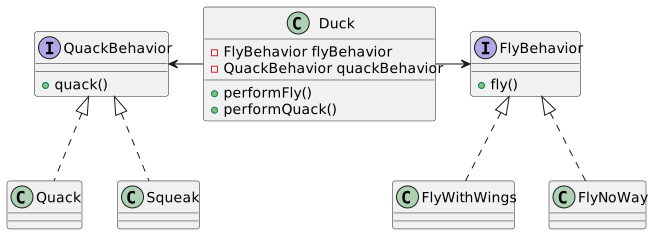
Implementing Duck Subclasses
Different types of ducks inherit from Duck class.
Each subclass implements its own display method.
Advantages of Strategy Pattern
Promotes flexible code structure.
Allows behaviors to change dynamically.
Reduces dependency on inheritance.
Decoupling Behaviors
Behaviors are not hard-coded in the Duck class.
They can vary independently from the duck type.
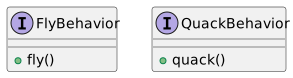
Defining Behavior Interfaces
- Define interfaces for each behavior.
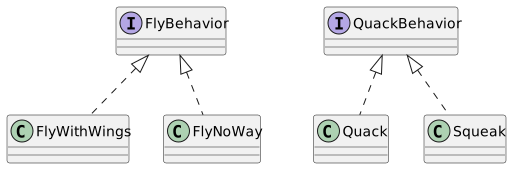
Concrete Implementations
- Implement different flying and quacking behaviors.
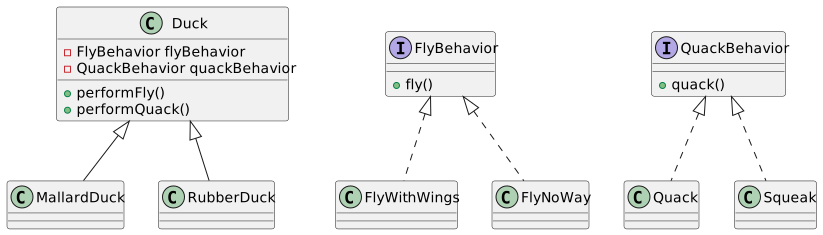
Strategy Pattern in Duck Subclasses
- Subclasses of Duck can choose different behaviors.
Strategy Pattern: Flexibility
- Easy to add new behaviors without modifying existing classes.
Problem: Code Duplication in Inheritance
- Inheritance can lead to duplicated code across subclasses.
Solving Code Duplication
- Strategy Pattern avoids duplication by sharing behavior implementations.
Dependency Injection
- Behaviors are injected into Duck instances.
- Increases flexibility and testability.
Strategy Pattern in Context
- Allows ducks to have various combinations of behaviors.
- Easy to maintain and extend.
Conclusion: Strategy Pattern
The Strategy Pattern is a powerful tool for creating flexible, maintainable code.
Encourages composition over inheritance.
Enables dynamic behavior assignment.
Observer Pattern
Understanding the Problem
- Scenario: When an object changes its state, other objects need to be notified.
- Challenge: Continuously checking (polling) the state of an object is inefficient.
Basics of Observer Pattern
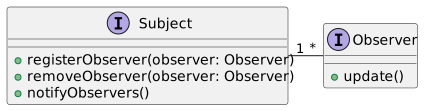
- Definition: A design pattern where an object, known as the subject, notifies a list of observers about its state changes.
- Key Concept: Push vs. Pull notification.
UML Diagram: Basic Structure
Real-World Example: Weather Station
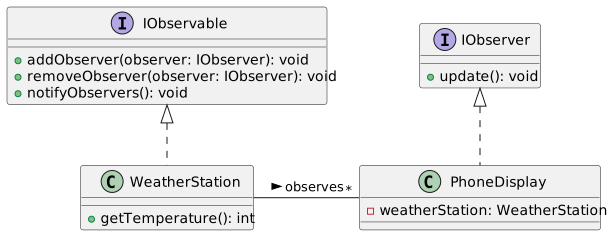
- Observable: Weather Station measuring and updating weather data.
- Observers: Displays (e.g., phone display, window display) showing updated weather.
UML Diagram: Weather Station Example
Java Implementation: Interfaces
Java Implementation: WeatherStation
Java Implementation: PhoneDisplay
Advantages of Observer Pattern
- Reduces Coupling: Observers are loosely coupled with the subject.
- Real-time Update: Efficient update mechanism for state changes.
Observer Pattern: Push vs. Pull
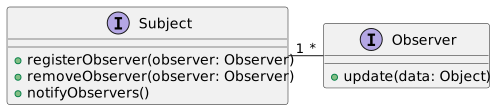
Push Model: Subject sends detailed data to observers.
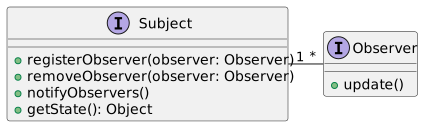
Pull Model: Observers request data from the subject.
UML Diagram: Push Model
UML Diagram: Pull Model
Java Implementation: Push Model
Java Implementation: Pull Model
Registering Observers
- Observers must register themselves to the subject.
- Allows dynamic addition and removal of observers.
Java Code: Observer Registration
Benefits of Observer Pattern
- Scalability: Easily add new observers without modifying the subject.
- Flexibility: Supports both push and pull data models.
Observer Pattern: Limitations
- Potential for Memory Leaks: Observers need to be explicitly removed.
- Unexpected Updates: Observers might receive updates at unpredictable times.
Summary and Conclusion
- Observer Pattern is crucial for state change notification in software design.
- Offers a robust, scalable, and flexible solution for maintaining consistency across different parts of a system.
- Suitable for various applications like UI, weather monitoring, and more.
Decorator Pattern
Object-Oriented Design Patterns
An introduction to the Decorator Pattern in software design.
Understanding its application in Java with practical examples.
Overview of Design Patterns
Design patterns provide solutions to common software design problems.
The Decorator Pattern is one of several key patterns in object-oriented design.
Source: “Head First Design Patterns” book.
The Problem Statement
The need to extend the functionality of objects dynamically.
Avoiding “class explosion” for similar yet distinct objects.
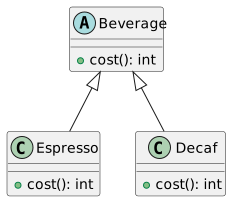
Example: Different types of coffee in a coffee house application.
Basic UML Representation
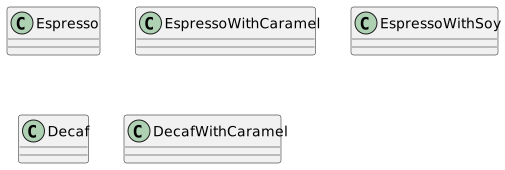
Class Explosion Problem
Multiple classes for each combination of coffee and add-ons (e.g., Espresso with Caramel, Decaf with Soy, etc.).
Results in a large, unmanageable number of subclasses.
Introduction to Decorator Pattern
A structural pattern for dynamically adding responsibilities to objects.
Avoids subclassing and promotes flexible design.
Decorator Pattern Structure
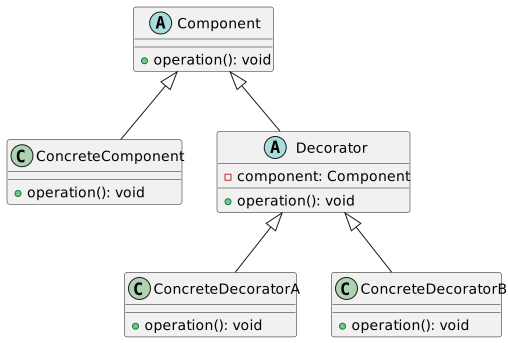
Applying Decorator Pattern - Example
Consider a coffee ordering system.
Decorators for each add-on (e.g., caramel, soy milk).
Concrete Decorators
public class CaramelDecorator extends AddOnDecorator {
    public CaramelDecorator(Beverage beverage) {
        this

beverage = beverage;
    }

    public int cost() {
        return beverage.cost() + 2; // Adding cost of caramel
    }
}

public class SoyDecorator extends AddOnDecorator {
    public SoyDecorator(Beverage beverage) {
        this.beverage = beverage;
    }

    public int cost() {
        return beverage.cost() + 1; // Adding cost of soy
    }
}
Decorator Pattern in Action
Creating a coffee with add-ons.
Calculating the total cost dynamically.
Benefits of Decorator Pattern
Flexibility in adding new functionality.
Avoids class explosion by using composition over inheritance.
Easier to maintain and extend.
Limitations of Decorator Pattern
Can lead to complex code structures.
Difficulty in debugging, as it introduces layers of abstraction.
Potential performance issues due to increased object creation.
Real-World Example - I/O Streams in Java
Decorator pattern used extensively in Java I/O classes.
Example:
BufferedInputStreamwraps anInputStream.
Comparing with Other Patterns
Composite Pattern
Similar structure but different intent.
Composite builds a hierarchy of objects.
Proxy Pattern
Provides a surrogate or placeholder for another object.
Similar wrapping concept but for different purposes.
UML for Advanced Decorator Example
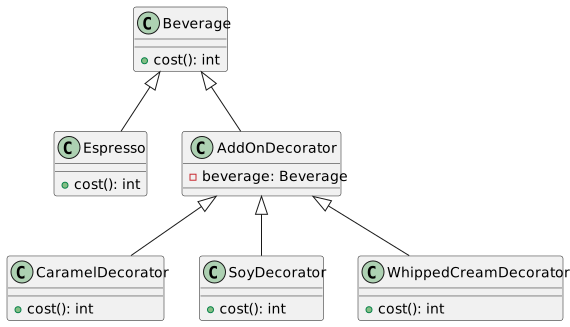
Implementing Whipped Cream Decorator
Dynamically Composing Beverages
Illustrating the dynamic nature of the Decorator Pattern.
Composing beverages with multiple add-ons at runtime.
Decorator Pattern vs Subclassing
Decorator Pattern allows for more flexibility than subclassing.
Avoids rigid class hierarchy.
Promotes loose coupling and adherence to the Open-Closed Principle.
Code Management and Best Practices
Ensure clarity in your decorator and component interfaces.
Avoid overuse of the pattern to prevent excessive complexity.
Consider the impact on system design and maintenance.
Summary and Key Takeaways
Decorator Pattern adds responsibilities to objects dynamically.
Enhances flexibility and reusability in object-oriented design.
Balances between complexity and extensibility.
Applied effectively in scenarios requiring runtime modification of behavior.
Factory Method Pattern
Introduction to Factory Pattern
- Essential design pattern in object-oriented programming
- Focuses on object creation mechanisms
- Aims to create objects in a manner suitable to the situation
Types of Factory Pattern
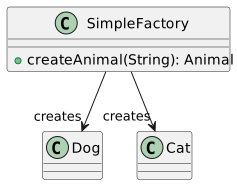
- Simple Factory
- Factory Method
- Abstract Factory
Note: Simple Factory is not a true design pattern
Simple Factory
- Not considered a true design pattern
- Basic level of abstraction in object creation
Simple Factory UML Diagram
Factory Method Pattern
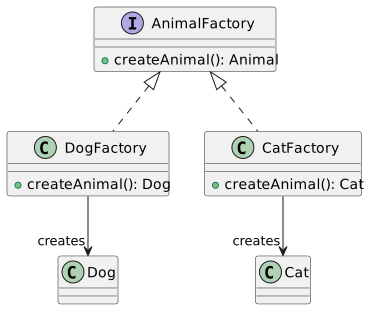
- Defines an interface for creating objects
- Delegates instantiation to subclasses
- Offers flexibility and encapsulation
Key Concepts
- Polymorphism
- Encapsulation
- Abstraction
Factory Method Example in Java
Factory Method UML Diagram
Abstract Factory Pattern
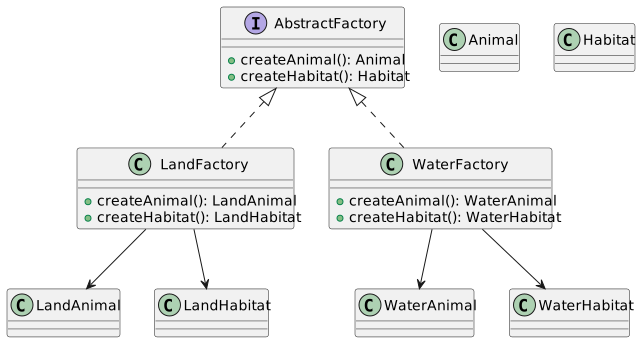
- Provides an interface for creating families of related objects
- Ensures that related objects are created together
When to Use
When the system needs to be independent of how its objects are created
When the family of related objects is designed to be used together
Abstract Factory Example in Java
Abstract Factory UML Diagram
Polymorphism in Factory Pattern
- Core concept in Factory Pattern
- Allows objects to be treated as instances of their parent type
Benefits
- Flexibility in object creation
- Easier maintenance and extension
Polymorphism Example
Dependency Injection
- Related concept in object-oriented design
- Objects are passed their dependencies rather than creating them internally
Use in Factory Pattern
- Simplifies creation of objects
- Increases flexibility and testability
Dependency Injection Example
Encapsulation in Factory Pattern
- Hides the creation logic of objects
- Exposes only the necessary information
Benefits
- Reduces complexity
- Enhances modularity and maintainability
Encapsulation Example
Factory Pattern in Game Development
- Widely used in game design
- Helps manage and create game entities dynamically
Example
- Use in creating different types of enemies or levels
Game Development Example
Advantages of the Factory Pattern
- Simplifies object creation
- Promotes code reuse and separation of concerns
- Increases system modularity and scalability
Key Points
- Reduces direct dependencies
- Enhances flexibility and maintainability
Factory Pattern in Complex Systems
- Ideal for systems with complex object creation
- Useful in scenarios requiring various instances of classes
Application Areas
- Software toolkits and frameworks
- User interface libraries
- Complex business logic
Summary and Conclusion
- Factory Pattern is a fundamental design pattern in OOP
- Offers solutions for complex object creation
- Encourages clean, maintainable, and scalable code
Final Thoughts
- Essential for any software developer’s toolkit
- Understanding and applying the Factory Pattern leads to better software design
Abstract Factory Pattern
Introduction to Design Patterns
Design Patterns are typical solutions to common problems in software design.
Each pattern is like a blueprint that can be customized to solve a particular design problem in your code.
Reference Book: “Head First Design Patterns”.
Factory Method Pattern
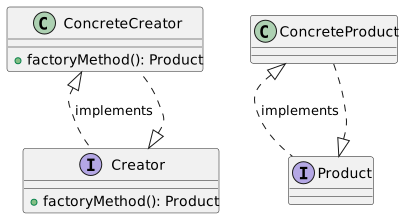
The Factory Method Pattern defines an interface for creating an object but lets subclasses decide which class to instantiate.
It allows a class to defer instantiation to subclasses.
Key Components:
Creator (Interface or Abstract Class)
Concrete Creator
Product (Interface or Abstract Class)
Concrete Product
Factory Method Pattern: UML Diagram
Factory Method Pattern: Java Example
Abstract Factory Pattern Introduction
The Abstract Factory Pattern provides an interface for creating families of related or dependent objects without specifying their concrete classes.
It’s a step above the Factory Method Pattern.
Useful for creating a suite of related products.
Abstract Factory vs Factory Method
Factory Method: Creates objects through inheritance.
Abstract Factory: Creates families of related objects without specifying their concrete classes.
Focus on group of products rather than one.
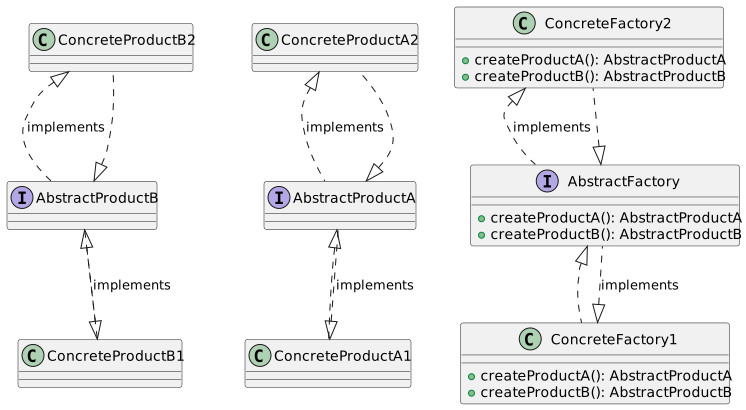
Abstract Factory Pattern: Key Components
- Abstract Factory: Interface for creating a family of products.
- Concrete Factory: Implements the operations to create concrete products.
- Abstract Product: Declares an interface for a type of product object.
- Concrete Product: Implements the Abstract Product interface.
Abstract Factory Pattern: UML Diagram
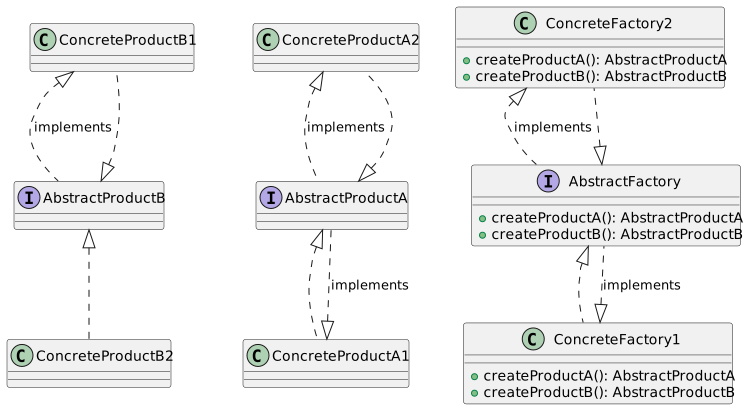
Abstract Factory Pattern: UML Diagram
Abstract Factory Pattern: Java Example
public interface AbstractFactory {
    AbstractProductA createProductA();
    AbstractProductB createProductB();
}

public class ConcreteFactory1 implements AbstractFactory {
    public AbstractProductA createProductA() {
        return new ConcreteProductA1();
    }
    public AbstractProductB createProductB() {
        return new ConcreteProductB1();
    }
}

// Similar implementation for ConcreteFactory2, ConcreteProductA2, and ConcreteProductB2
Abstract Factory Pattern: Product Families
- Abstract Factory enables the creation of products that are related or dependent.
- Ensures consistency within a product family.
- Example:
- A UI toolkit could provide a factory for each platform (Windows, MacOS, Linux), where each factory produces compatible components.
Abstract Factory: Handling Complex Creations
Abstract Factory is ideal for complex creation processes involving multiple steps.
It can manage dependencies between different products.
Example: Creating a cohesive UI theme (Dark, Light) with compatible components (Buttons, Labels).
Abstract Factory: Dependency Management
Abstract Factory assists in managing dependencies between objects.
Ensures that objects which are meant to work together are compatible.
Example: Ensuring that MacOS Alert Dialogues use MacOS Buttons, not Windows Buttons.
Abstract Factory Pattern: Extended UML Diagram
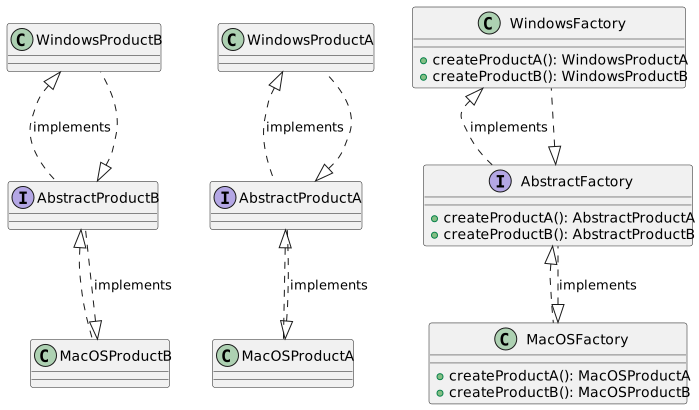
Cross-Platform UI Example with Abstract Factory
Use Abstract Factory for platform-independent UI creation.
Factories for each platform (MacOS, Windows, Linux) ensure compatible UI elements.
Streamlines development for multi-platform applications.
Abstract Factory: Ensuring Consistency
Guarantees that created objects are consistent with each other.
Prevents mixing incompatible components.
Example: A MacOS alert box will not mistakenly use a Windows button.
Abstract Factory: Flexibility in Creation
Offers flexibility in creating families of objects.
Factories can be easily switched to change the family of created objects.
Useful in scenarios like switching themes or platforms.
Abstract Factory: Example in Theme Switching
Ideal for scenarios like theme switching in an application.
Dark and Light theme factories create UI components with consistent styling.
Simplifies dynamic theme changes in the application.
Abstract Factory: Benefits and Drawbacks
Benefits
Consistency: Ensures products from a family are compatible.
Flexibility: Easy to introduce new families of products.
Scalability: Simplifies adding new products to existing families.
Drawbacks
Complexity: Can be overkill for simple scenarios.
Modifiability: Changing one part of the system can affect others.
Abstractness: High level of abstraction can be challenging to understand.
Advanced Use: Abstract Factory with Dependency Injection
Abstract Factory can be combined with Dependency Injection for greater flexibility.
Factories are injected into classes that need to create objects.
This approach decouples the creation logic even further from usage.
Practical Application: UI Control Factory
- Abstract Factory is used to create UI controls like buttons, menus, windows.
- Example: A
UIControlFactoryinterface with methods likecreateButton(),createWindow(). - Different concrete factories implement this interface for different platforms or themes.
Code Example: Theme-Specific UI Controls
public interface UIControlFactory {
    Button createButton();
    Window createWindow();
}

public class DarkThemeUIControlFactory implements UIControlFactory {
    public Button createButton() {
        return new DarkThemeButton();
    }
    public Window createWindow() {
        return new DarkThemeWindow();
    }
}

public class LightThemeUIControlFactory implements UIControlFactory {
    public Button createButton() {
        return new LightThemeButton();
    }
    public Window createWindow() {
        return new LightThemeWindow();
    }
}
Conclusion: Abstract Factory in Design Patterns
- Abstract Factory is a powerful pattern for creating families of objects.
- Encourages consistency and flexibility in your software design.
- While complex, it’s invaluable for applications requiring scalability and modular design.
- Remember to balance the use of design patterns with the specific needs of your application.
Singleton Pattern
What is Singleton Pattern?
The Singleton Pattern is a design pattern that:
- Ensures a class has only one instance
- Provides a global point of access to that instance
This pattern is useful for coordinating actions across a system.
Singleton Pattern
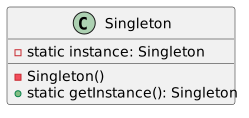
Singleton Pattern in Java - Basic Structure
Why Use Singleton?
- Resource Management: Singleton can be used to manage resources like database connections.
- Consistency: Ensures that a class has only one instance, maintaining a consistent state across the application.
- Global Access: Provides a universally accessible instance.
The Controversy Around Singleton
- Global State: Singleton can introduce a global state in an application, leading to hidden dependencies.
- Code Smell: Some argue that Singleton is a code smell, suggesting poor design.
- Testing Difficulty: Singletons can make unit testing difficult due to their global state.
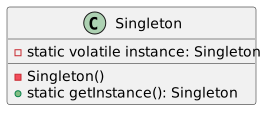
Implementing Singleton - Thread Safety
Thread safety is crucial in Singleton implementation, especially in multithreaded applications.
Thread-Safe Singleton
Use Case: Singleton in a Chat Application
Imagine a chat application where you initially think there’s only one chat room.
- Singleton Chat: Initially, the chat is designed as a Singleton.
- Evolution: Over time, the need for multiple chat rooms becomes evident.
This example illustrates how the assumption of a single instance can limit application scalability.
Singleton Pattern - Breaking the Single Instance Assumption
Singleton assumes you’ll never need more than one instance, but this isn’t always true.
- Scalability: As applications grow, the need for multiple instances of a class can arise.
- Flexibility: Design patterns should not restrict future enhancements or changes.
Advanced Singleton Implementation
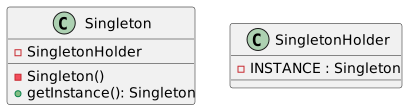
Let’s delve deeper into the Singleton pattern with an advanced implementation.
public class Singleton {
    private static class SingletonHolder {
        private static final Singleton INSTANCE = new Singleton();
    }

    private Singleton() {
        // Private Constructor
    }

    public static Singleton getInstance() {
        return SingletonHolder.INSTANCE;
    }
}
This approach uses a static inner class for lazy initialization and is thread-safe without synchronization.
UML Diagram - Advanced Singleton
Singleton Pattern – Alternative: Dependency Injection
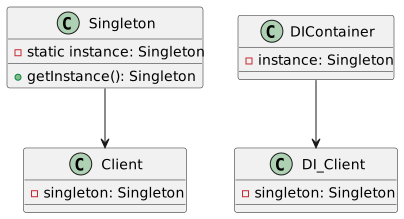
Instead of using Singleton, consider Dependency Injection (DI) for better testability and flexibility.
- DI Frameworks: Such as Spring or Guice
- Advantages: Easier testing, decouples object creation and business logic
Singleton Pattern and the Single Responsibility Principle
Singleton often violates the Single Responsibility Principle (SRP) by:
- Managing its own instance creation and lifecycle.
- Performing the unique business logic of its class.
Consider splitting these responsibilities for better design.
The Problem with Globals in Singleton
Singleton introduces globals, which can lead to:
- Unpredictable Side Effects: Global state changes are hard to track and debug.
- Coupling: Tight coupling of different parts of the application.
Singleton vs. Dependency Injection
Testing Challenges with Singleton
Singletons pose challenges for unit testing:
- Mocking Difficulties: Hard to replace with mock implementations.
- State Persistence: State persists between tests, leading to potential test interference.
Real-World Applications of Singleton
Singletons are often used in scenarios like:
- Configuration Settings: Managing app-wide configurations.
- Database Connection Pools: Managing a shared resource pool.
Conclusion and Further Reading
- Singleton is a powerful, yet controversial pattern.
- Be mindful of its limitations and alternatives.
- Further Reading: Explore “Head First Design Patterns” for deeper insights.
Criticisms of Singleton Pattern
Singleton pattern faces several criticisms:
- Inflexibility: Hard to adapt when the assumption of a single instance no longer holds.
- Hidden Dependencies: Creates hidden dependencies in code, making it less modular.
- Scalability Issues: Singleton can become a bottleneck in large, scalable applications.
Singleton Pattern and Global State
The Singleton pattern and its impact on global state:
- Global State Management: Singleton manages a global state, which can be problematic.
- Reasoning About Code: Global state makes it harder to understand and maintain code.
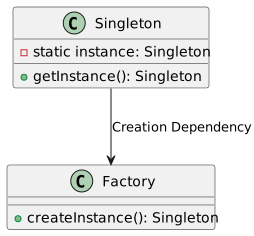
Singleton vs. Factory Pattern
Summary and Key Takeaways
- Singleton Pattern: Ensures a single instance and global access.
- Use with Caution: Be aware of its limitations in terms of flexibility, testability, and scalability.
- Alternatives: Consider other patterns and approaches for better design outcomes.
Command Pattern
Introduction to the Command Pattern
Origin: Discussed in “Head First Design Patterns” and “Design Patterns: Elements of Reusable Object-Oriented Software” by the Gang of Four.
Purpose: Encapsulates a request as an object.
Benefits:
Parameterization of objects with different requests.
Enabling queuing or logging of requests.
Supporting undoable operations.
Basic Concept
Command Pattern Structure:
Command: An object encapsulating a request.
Invoker: Sends the command.
Receiver: The object receiving and executing the request.
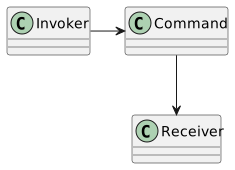
Real-World Example: Smart Home Automation
Scenario: Controlling smart devices like lights, thermostats.
Application: Creating a smartphone app for device control.
Encapsulating Commands
Objective: Encapsulate each action (e.g., turning on a light) as a command.
Advantage: Commands can be passed and manipulated independently of the receiver.
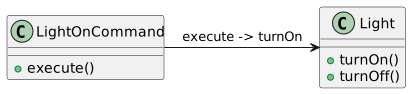
Parameterizing Objects with Commands
Concept: Objects can be configured with commands to perform various actions.
Example: A remote control with buttons assigned to different light commands.
Command Queuing and Logging
Queuing: Store and execute commands in sequence.
Logging: Keep a record of executed commands for auditing or replaying.
Supporting Undoable Operations
Implementation: Each command has an
executeandundomethod.Use Case: Reversing a command, like turning off a light that was turned on.
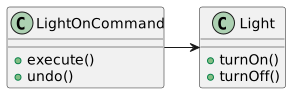
Java Example: Command Interface
- Role: Define a common interface for all commands.
Java Example: Concrete Command
public class LightOnCommand implements Command {
    private Light light;

    public LightOnCommand(Light light) {
        this.light = light;
    }

    public void execute() {
        light.turnOn();
    }

    public void

undo() {
        light.turnOff();
    }
}- Explanation:
LightOnCommandencapsulates the action of turning on a light.
Java Example: Invoker Implementation
public class RemoteControl {
    private Command[] commands;

    public RemoteControl() {
        commands = new Command[4]; // Assuming 4 buttons
    }

    public void setCommand(int slot, Command command) {
        commands[slot] = command;
    }

    public void buttonPressed(int slot) {
        if (commands[slot] != null) {
            commands[slot].execute();
        }
    }
}- Role of
RemoteControl: Acts as an invoker that triggers commands.
Dependency Injection in Command Pattern
- Purpose: To dynamically assign a receiver to a command.
- Benefit: Increases flexibility and decouples command from specific receivers.
Macro Commands
Concept: A command that contains multiple commands.
Use Case: Executing a batch of commands with a single action.
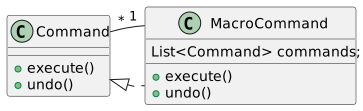
Queueing Commands
Implementation: Commands can be added to a queue and executed in order.
Application: Useful for scheduling and executing tasks sequentially.
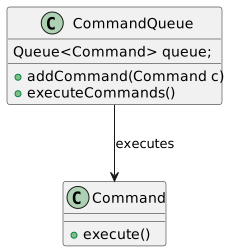
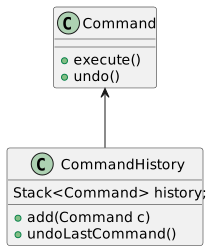
Undo Mechanism
Concept: Providing an
undomethod in each command to reverse its action.Implementation: Storing the history of executed commands for undo operations.
Java Example: Undo Functionality
public class RemoteControlWithUndo {
    private Command[] commands;
    private Stack<Command> history = new Stack<>();

    public void setCommand(int slot, Command command) {
        commands[slot] = command;
    }

    public void pressedButton(int slot) {
        if (commands[slot] != null) {
            commands[slot].execute();
            history.push(commands[slot]);
        }
    }

    public void pressedUndo() {
        if (!history.isEmpty()) {
            history.pop().undo();
        }
    }
}- Note:
RemoteControlWithUndokeeps track of command history for undo operations.
Advantages of Command Pattern
Flexibility: Commands can be added, removed, or modified independently.
Reusability: Commands can be used across different contexts and applications.
Extensibility: Easy to add new commands without changing existing code.
Command Pattern in User Interfaces
Application: Assigning commands to UI elements like buttons, menus.
Example: A toolbar with buttons executing different commands in an application.
Composite Command Pattern
Concept: Combining multiple commands into a single composite command.
Use Case: Complex operations that require executing several commands in a sequence.
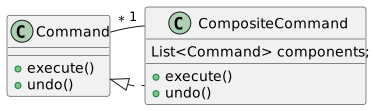
Implementing Command Pattern in Different Programming Paradigms
Object-Oriented Programming: Encapsulating actions as objects.
Functional Programming: Treating functions as first-class citizens, similar to commands in OOP.
Summary and Key Takeaways
Command Pattern: Encapsulates requests as objects, offering flexibility and extensibility.
Key Components: Command, Invoker, Receiver.
Benefits:
Decoupling of command execution from its invocation.
Support for undo operations.
Enhanced control over operations, including queuing and logging.
Applications: Widely used in GUIs, transactional systems, and more.
Adapter Design Pattern
Introduction to Design Patterns
Understanding the core concepts of software design patterns.
Focus on Adapter, Facade, Proxy, and Decorator patterns.
Reference Book: Head First Design Patterns.
Design Patterns Overview
Patterns as solutions to common software design problems.
Patterns provide a standard terminology and specific to problems.
Four key patterns: Adapter, Facade, Proxy, and Decorator.
The Adapter Pattern
Purpose: To make two incompatible interfaces compatible.
Also known as a “wrapper.”
Use Case: Connecting new code to legacy code or third-party libraries.
Adapter Pattern UML Diagram
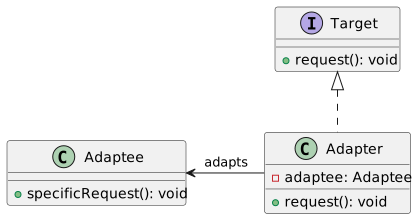
Adapter Pattern Java Example
// Target Interface
public interface MediaPlayer {
    void play(String audioType, String fileName);
}

// Adapter Class
public class MediaAdapter implements MediaPlayer {

    AdvancedMediaPlayer advancedMusicPlayer;

    public MediaAdapter(String audioType){
        if(audioType.equalsIgnoreCase("vlc") ){
            advancedMusicPlayer = new VlcPlayer();
        } else if (audioType.equalsIgnoreCase("mp4")){
            advancedMusicPlayer = new Mp4Player();
        }
    }

    @Override
    public void play(String audioType, String fileName) {
        if(audioType.equalsIgnoreCase("vlc")){
            advancedMusicPlayer.playVlc(fileName);
        } else if(audioType.equalsIgnoreCase("mp4")){
            advancedMusicPlayer.playMp4(fileName);
        }
    }
}
The Facade Pattern
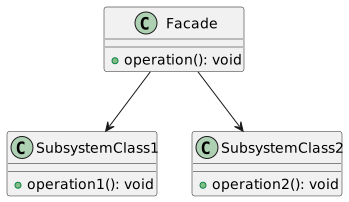
Simplifies complex system interactions.
Provides a unified interface to a set of interfaces in a subsystem.
Example: Starting a car (Key Turn → Engine Start, Lights On, etc.)
Facade Pattern UML Diagram
Facade Pattern Java Example
// Facade Class
public class CarEngineFacade {
    private Ignition ignition;
    private FuelInjector fuelInjector;
    private AirFlowController airFlowController;

    public CarEngineFacade() {
        ignition = new Ignition();
        fuelInjector = new FuelInjector();
        airFlowController = new AirFlowController();
    }

    public void startEngine() {
        fuelInjector.on();
        airFlowController.takeAir();
        ignition.ignite();
        // Other complex interactions
    }

    public void stopEngine() {
        fuelInjector.off();
        airFlow

Controller.cutAir();
        ignition.off();
        // Other shutdown interactions
    }
}
The Proxy Pattern
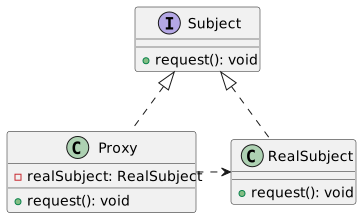
Provides a surrogate or placeholder for another object.
Controls access to the original object.
Use cases: Security, Remote Object Access, Lazy Initialization.
Proxy Pattern UML Diagram
Proxy Pattern Java Example
// RealSubject Class
public class RealImage implements Image {

    private String fileName;

    public RealImage(String fileName){
        this.fileName = fileName;
        loadFromDisk(fileName);
    }

    @Override
    public void display() {
        System.out.println("Displaying " + fileName);
    }

    private void loadFromDisk(String fileName){
        System.out.println("Loading " + fileName);
    }
}

// Proxy Class
public class ProxyImage implements Image {

    private RealImage realImage;
    private String fileName;

    public ProxyImage(String fileName){
        this.fileName = fileName;
    }

    @Override
    public void display() {
        if(realImage == null){
            realImage = new RealImage(fileName);
        }
        realImage.display();
    }
}
The Decorator Pattern
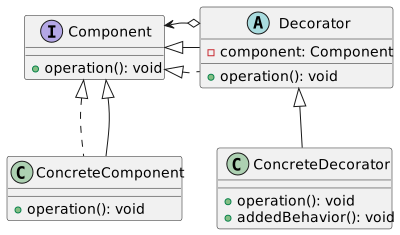
Adds new functionality to an object dynamically.
More flexible than static inheritance.
Example: Adding scrolling to a window in a GUI framework.
Decorator Pattern UML Diagram
Decorator Pattern Java Example
// Component Interface
public interface Shape {
    void draw();
}

// Concrete Component
public class Rectangle implements Shape {

    @Override
    public void draw() {
        System.out.println("Shape: Rectangle");
    }
}

// Decorator Class
public abstract class ShapeDecorator implements Shape {
    protected Shape decoratedShape;

    public ShapeDecorator(Shape decoratedShape){
        this.decoratedShape = decoratedShape;
    }

    public void draw(){
        decoratedShape.draw();
    }
}

// Concrete Decorator
public class RedShapeDecorator extends ShapeDecorator {

    public RedShapeDecorator(Shape decoratedShape) {
        super(decoratedShape);
    }

    @Override
    public void draw() {
        decoratedShape.draw();
        setRedBorder(decoratedShape);
    }

    private void setRedBorder(Shape decoratedShape){
        System.out.println("Border Color: Red");
    }
}
Comparing Design Patterns
Understanding the subtle differences.
Adapter vs. Facade vs. Proxy vs. Decorator.
Each solves specific design issues in object-oriented programming.
Adapter vs. Facade
Adapter: Makes two incompatible interfaces work together.
Facade: Provides a simplified interface to a complex subsystem.
Comparison: Adapter changes the interface; Facade simplifies it.
Facade vs. Proxy
Facade: Simplifies access to a complex system.
Proxy: Controls access to an object, often adding additional functionality.
Comparison: Facade is structural; Proxy often adds behavior.
Proxy vs. Decorator
Proxy: Acts as an intermediary for another object.
Decorator: Adds responsibilities to an object dynamically.
Comparison: Proxy controls access; Decorator enhances functionality.
Adapter vs. Decorator
Adapter: Allows otherwise incompatible interfaces to work together.
Decorator: Enhances an object with additional features.
Comparison: Adapter is about compatibility; Decorator is about enhancement.
Recap and Conclusion
Reviewed key design patterns: Adapter, Facade, Proxy, and Decorator.
Discussed the importance and application of each pattern.
Highlighted differences and specific use cases.
Recommended reading: Head First Design Patterns for deeper understanding.
Facade Pattern
Introduction to Design Patterns
Focus: Facade Pattern
Context: Software Design Patterns
References:
“Design Patterns: Elements of Reusable Object-Oriented Software” by Gang of Four
“Head First Design Patterns”
The Facade Pattern - Overview
Definition: Simplifies complex system interactions
Purpose: Provide a unified interface to a set of interfaces in a subsystem
Key Principle: High-level abstraction over complex subsystems
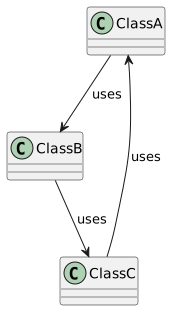
Understanding System Complexity
Scenario: Multiple classes with intricate interactions
Challenge: Managing complex dependencies and interactions
The Client’s Perspective
Client: User of a piece of code, not end-user
Problem: Need to interact with complex subsystems
The Law of Demeter
Principle: Minimize coupling between modules
Rule: Object should only talk to immediate friends
Simplified:
a.B()is allowed, buta.B().C()is not
Single Responsibility Principle
Concept: Each class should have one responsibility
Benefit: Easier maintenance and understanding
The Need for the Facade Pattern
Complexity: High due to multiple, interdependent classes
Solution: Simplify interaction using a facade
Facade Pattern - Basic UML Diagram
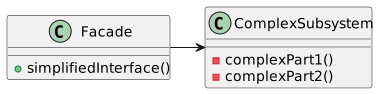
Java Example - Facade Pattern
public class ComplexSystemFacade {
    private SubsystemOne one;
    private SubsystemTwo two;
    private SubsystemThree three;

    public ComplexSystemFacade() {
        one = new SubsystemOne();
        two = new SubsystemTwo();
        three = new SubsystemThree();
    }

    public void simplify() {
        one.operation();
        two.operation();
        three.operation();
    }
}

class SubsystemOne { void operation() {} }
class SubsystemTwo { void operation() {} }
class SubsystemThree { void operation() {} }
Advantages of Facade Pattern
Simplicity: Provides simple interface to complex subsystems
Decoupling: Clients interact with facade rather than direct subsystem
Maintainability: Changes in subsystems less likely to affect clients
Proxy Design Pattern
Introduction to Proxy Design Pattern
Proxy Pattern in Software Design
Part of the Structural Patterns
Key Concept: Controlling access to another object
Importance of Design Patterns
Fundamental to software engineering
Provides solutions to common problems
Enhances code maintainability and flexibility
What is the Proxy Pattern?
Acts as a surrogate or placeholder
Manages access to another object
Adds a level of indirection in object access
Types of Proxy Patterns
Remote Proxy: Accessing remote resources
Virtual Proxy: Managing expensive resource creation
Protection Proxy: Controlling access based on permissions
Remote Proxy
Used for interacting with remote resources
Example: Data from a different server
Acts as an intermediary for remote method calls
Virtual Proxy
Controls access to resource-intensive objects
Delays the creation of the object until necessary
Example: Lazy initialization for performance optimization
Protection Proxy
Manages access based on access rights
Ensures only authorized access to an object
Common in scenarios requiring security and permissions
Proxy Pattern - Basic UML Diagram
Proxy Pattern Example in Java
public interface BookParser {
    int getNumberOfPages();
}

public class RealBookParser implements BookParser {
    private String bookContent;

    public RealBookParser(String bookContent) {
        // Expensive parsing operation
        this.bookContent = bookContent;
    }

    @Override
    public int getNumberOfPages() {
        // Return calculated pages
        return 0; // Simplified for example
    }
}

public class LazyBookParserProxy implements BookParser {
    private RealBookParser realParser;
    private String bookContent;

    public LazyBookParserProxy(String bookContent) {
        this.bookContent = bookContent;
    }

    @Override
    public int getNumberOfPages() {
        if (realParser == null) {
            realParser = new RealBookParser(bookContent);
        }
        return realParser.getNumberOfPages();
    }
}
Proxy vs. Real Object
Proxy mimics the real object
Transparent to the client
Adds control layer over real object access
Implementing Remote Proxy in Java
public interface RemoteService {
    String fetchData();
}

public class RemoteServiceImpl implements RemoteService {
    public String fetchData() {
        // Simulates fetching data over network
        return "Data";
    }
}

public class RemoteProxy implements RemoteService {
    private RemoteService remoteService = new RemoteServiceImpl();

    public String fetchData() {
        // Additional control logic can be added here
        return remoteService.fetchData();
    }
}
Implementing Virtual Proxy in Java
public interface Image {
    void display();
}

public class HighResolutionImage implements Image {
    public HighResolutionImage(String imagePath) {
        // Load image from disk - heavy operation
    }

    public void display() {
        // Display the image
    }
}

public class ImageProxy implements Image {
    private HighResolutionImage highResImage;
    private String imagePath;

    public ImageProxy(String imagePath) {
        this.imagePath = imagePath;
    }

    public void display() {
        if (highResImage == null) {
            highResImage = new HighResolutionImage(imagePath);
        }
        highResImage.display();
    }
}
Implementing Protection Proxy in Java
public interface SecureResource {
    void accessResource();
}

public class RealResource implements SecureResource {
    public void accessResource() {
        // Access the secure resource
    }
}

public class SecurityProxy implements SecureResource {
    private RealResource realResource;
    private boolean hasAccess;

    public SecurityProxy(boolean hasAccess) {
        this.realResource = new RealResource();
        this.hasAccess = hasAccess;
    }

    public void accessResource() {
        if (hasAccess) {
            realResource.accessResource();
        } else {
            throw new IllegalStateException("Access Denied");
        }
    }
}
Proxy Pattern in Web Services
Used in API gateways
Manages requests to various microservices
Adds security, load balancing, and caching
Proxy for Database Access Control
Manages database connections
Provides a layer for security and transaction management
Example: Hibernate uses proxies for lazy loading
Proxy for Lazy Initialization
Defers object creation until needed
Reduces initial load time
Common in resource-intensive applications
Proxy for Access Auditing
Logs and monitors access to objects
Useful in security-sensitive applications
Proxy adds logging mechanism transparently
Pros and Cons of Proxy Pattern
Pros
Separation of concerns
Enhanced security
Flexibility and scalability
Cons
Increased complexity
Potential performance overhead
Summary and Conclusion
Proxy pattern is a fundamental structural design pattern
Provides control over access to objects
Versatile with various applications in software development
Requires careful implementation to balance benefits and complexity
Bridge Design Pattern
Design Patterns and the Bridge Pattern
This presentation explores design patterns in software engineering, with a focus on the Bridge Pattern.
Design Patterns: Reusable solutions to common problems in software design.
Bridge Pattern: A structural design pattern that decouples an abstraction from its implementation.
Problem Statement
Before diving into the Bridge pattern, let’s understand the problem it addresses:
Coupling: Tight coupling between an abstraction (interface) and its implementation (concrete classes).
Inflexibility: Difficulty in extending or modifying abstractions and implementations independently.
Bridge Pattern Overview
The Bridge pattern addresses the issues of tight coupling and inflexibility.
Decouples abstraction from its implementation.
Independence: Abstractions and implementations can vary independently.
UML Diagram for Bridge Pattern
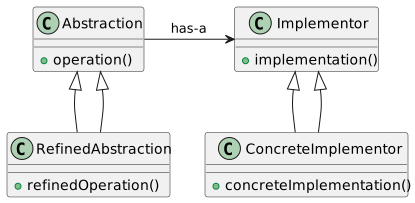
Key Components
Abstraction: Defines the abstract interface.
Refined Abstraction: Extends the abstraction with additional features.
Implementor: Defines the interface for implementation classes.
Concrete Implementor: Implements the implementor interface.
Example Scenario: Media Display
Consider an application displaying various media types (e.g., books, artists) in different formats (e.g., long-form, short-form).
Problem: How to handle different media types and display formats without creating a complex class hierarchy?
Solution: Use the Bridge pattern for flexible and maintainable code.
UML Diagram for Media Display Example
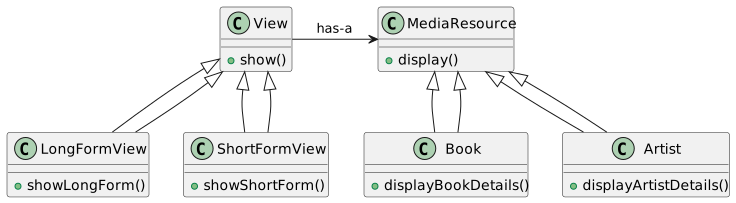
Implementing Bridge in Java - Abstraction and Implementor
Implementing Bridge in Java - Concrete Implementations
Implementing Bridge in Java - Refined Abstractions
// Refined Abstraction (LongFormView.java)
public class LongFormView extends View {
    public LongFormView(MediaResource resource) {
        super(resource);
    }

    public void show() {
        // Show in long-form format
        resource.display();
    }
}

// Refined Abstraction (ShortFormView.java)
public class ShortFormView extends View {
    public ShortFormView(MediaResource resource) {
        super(resource);
    }

    public void show() {
        // Show in short-form format
        resource.display();
    }
}
Advantages of the Bridge Pattern
Flexibility: Allows abstraction and implementation to vary independently.
Extensibility: Easy to extend both hierarchies without affecting each other.
Single Responsibility Principle: Separates high-level logic from low-level details.
Decoupling Concept
The Bridge pattern emphasizes decoupling abstraction (e.g., View) from its implementation (e.g., MediaResource) for greater flexibility and maintainability.
Real-world Analogy
Think of the Bridge pattern like a TV remote (abstraction) and a TV (implementation). The remote can control different TVs (implementations), and TVs can be operated by different remotes (abstractions).
When to Use the Bridge Pattern
When you want to avoid a permanent binding between an abstraction and its implementation.
When both the abstractions and their implementations should be extensible by subclassing.
In applications where implementation details need to be hidden from the client.
Bridge vs. Adapter Pattern
Bridge: Designed up-front to separate abstraction and implementation.
Adapter: Used to make unrelated classes work together after they are designed.
Code Refinement
Refactoring a tightly coupled system using the Bridge pattern leads to more modular and maintainable code. It simplifies future changes and extensions to both abstractions and implementations.
Implementing Bridge Pattern in Java - Example
// Example implementation of the Bridge pattern in Java

// Abstraction
public abstract class Shape {
    protected Color color;

    public Shape(Color color) {
        this.color = color;
    }

    abstract public void draw();
}

// Implementor
public interface Color {
    public void fill();
}

// Refined Abstraction
public class Circle extends Shape {
    public Circle(Color color) {
        super(color);
    }

    public void draw() {
        System.out.println("Drawing Circle");
        color.fill();
    }
}

// Concrete Implementor
public class RedColor implements Color {
    public void fill() {
        System.out.println("Filling with red color");
    }
}
Considerations in Applying the Bridge Pattern
Analyze your application’s requirements to determine if the Bridge pattern is suitable.
Identify the orthogonal dimensions in your design (e.g., UI vs media types).
Use the Bridge pattern when you expect numerous variations in both dimensions.
Limitations of the Bridge Pattern
Complexity: Introduces additional layers which may complicate the code structure.
Overhead: May lead to a performance penalty due to increased indirection.
Suitability: Not ideal for simpler designs where flexibility isn’t a primary concern.
Summary and Conclusion
The Bridge pattern is a powerful tool for managing abstractions and implementations separately.
It offers flexibility, extensibility, and adherence to the Single Responsibility Principle.
Suitable for complex systems where variations in both abstractions and implementations are expected.
Structural Design Patterns (Comparision)
Structural Design Patterns in OOP
This lecture covers a comparison of several key structural design patterns in object-oriented programming:
- Bridge
- Adapter
- Decorator
- Proxy
- Facade
Reference Books: - Head First Design Patterns - Design Patterns: Elements of Reusable Object-Oriented Software
Bridge Pattern
Definition: Decouples an abstraction from its implementation so that the two can vary independently.
UML Diagram:
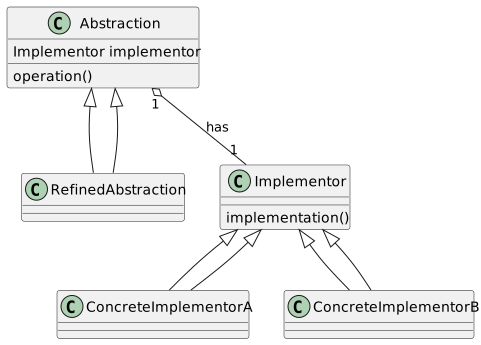
Bridge Pattern Java Example
// Abstraction
abstract class Abstraction {
    protected Implementor implementor;

    protected Abstraction(Implementor implementor) {
        this.implementor = implementor;
    }

    public abstract void operation();
}

// Refined Abstraction
class RefinedAbstraction extends Abstraction {
    protected RefinedAbstraction(Implementor implementor) {
        super(implementor);
    }

    public void operation() {
        implementor.implementation();
    }
}

// Implementor
interface Implementor {
    void implementation();
}

// Concrete Implementors
class ConcreteImplementorA implements Implementor {
    public void implementation() {
        // Implementation A
    }
}

class ConcreteImplementorB implements Implementor {
    public void implementation() {
        // Implementation B
    }
}
Adapter Pattern
Definition: Allows classes with incompatible interfaces to work together by wrapping its own interface around that of an already existing class.
UML Diagram:
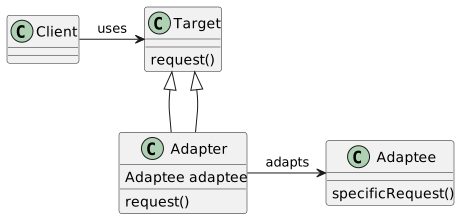
Adapter Pattern Java Example
// Target Interface
interface Target {
    void request();
}

// Adaptee
class Adaptee {
    void specificRequest() {
        // Specific Request
    }
}

// Adapter
class Adapter implements Target {
    private Adaptee adaptee = new Adaptee();

    public void request() {
        adaptee.specificRequest();
    }
}

// Client
class Client {
    private Target target;

    Client(Target target) {
        this.target = target;
    }

    void execute() {
        target.request();
    }
}
Decorator Pattern
Definition: Attaches additional responsibilities to an object dynamically. Decorators provide a flexible alternative to subclassing for extending functionality.
UML Diagram:
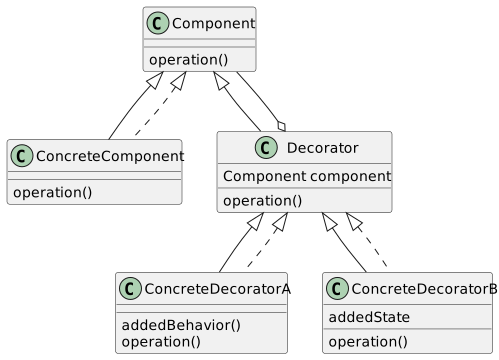
Decorator Pattern Java Example
// Component Interface
interface Component {
    void operation();
}

// Concrete Component
class ConcreteComponent implements Component {
    public void operation() {
        // Original Operation
    }
}

// Decorator
abstract class Decorator implements Component {
    protected Component component;

    public Decorator(Component component) {
        this.component = component;
    }

    public void operation() {
        component.operation();
    }
}

// Concrete Decorators
class ConcreteDecoratorA extends Decorator {
    public ConcreteDecoratorA(Component component) {
        super(component);
    }

    public void operation() {
        super.operation();
        addedBehavior();
    }

    private void addedBehavior() {
        // Additional Behavior A
    }
}

class ConcreteDecoratorB extends Decorator {
    private String addedState;

    public ConcreteDecoratorB(Component component, String addedState) {
        super(component);
        this.addedState = addedState;
    }

    public void operation() {
        super.operation();
        // Use addedState in operation
    }
}
Proxy Pattern
Definition: Provides a surrogate or placeholder for another object to control access to it.
UML Diagram:
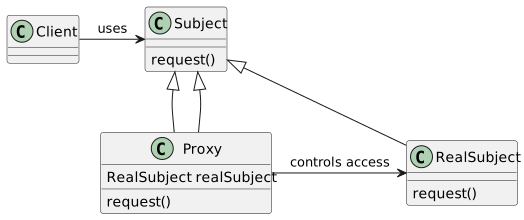
Proxy Pattern Java Example
// Subject Interface
interface Subject {
    void request();
}

// Real Subject
class RealSubject implements Subject {
    public void request() {
        // Real request handling
    }
}

// Proxy
class Proxy implements Subject {
    private RealSubject realSubject = new RealSubject();

    public void request() {
        // Access control, then delegate to real subject
        realSubject.request();
    }
}

// Client
class Client {
    private Subject subject;

    Client(Subject subject) {
        this.subject = subject;
    }

    void execute() {
        subject.request();
    }
}
Facade Pattern
Definition: Provides a unified interface to a set of interfaces in a subsystem, making the subsystem easier to use.
UML Diagram:
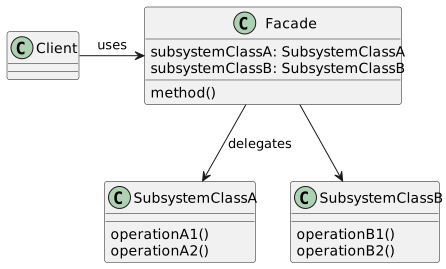
Facade Pattern Java Example
// Subsystem Class A
class SubsystemClassA {
    void operationA1() {
        // Operation A1
    }

    void operationA2() {
        // Operation A2
    }
}

// Subsystem Class B
class SubsystemClassB {
    void operationB1() {
        // Operation B1
    }

    void operationB2() {
        // Operation B2
    }
}

// Facade
class Facade {
    private SubsystemClassA subsystemA = new SubsystemClassA();
    private SubsystemClassB subsystemB = new SubsystemClassB();

    void method() {
        subsystemA.operationA1();
        subsystemA.operationA2();
        subsystemB.operationB1();
        subsystemB.operationB2();
    }
}

// Client
class Client {
    private Facade facade = new Facade();

    void execute() {
        facade.method();
    }
}
Comparing Design Patterns
We’ll now compare the structural design patterns discussed, focusing on their intent and structural differences.
Decorator: Adds behavior to an object dynamically.
Adapter: Bridges incompatible interfaces.
Facade: Simplifies complex system interfaces.
Proxy: Controls access to an object.
Bridge: Decouples abstraction from its implementation.
Decorator vs. Adapter
Decorator Pattern:
Adds responsibilities to objects.
Enhances object functionalities.
Uses composition to extend behavior.
Adapter Pattern:
Bridges the gap between incompatible interfaces.
Converts one interface to another.
Does not change the underlying object’s functionality.
Facade vs. Proxy
Facade Pattern: - Provides a simplified interface to a complex system. - Does not change the subsystem behavior. - Often used to encapsulate third-party libraries or complex subsystems.
Proxy Pattern:
Controls access to an object.
Can add additional behavior like lazy initialization, access control, logging.
Acts as a surrogate for the actual object.
Bridge Pattern Unique Traits
Bridge Pattern:
Separates an object’s interface from its implementation.
Allows for independent variation of an abstraction and its implementation.
Useful when both the interface and implementations can have different variations.
Design Pattern Selection Criteria
Choosing the right pattern depends on the problem context:
Complexity Reduction: Facade if simplifying complex interactions is needed.
Interface Compatibility: Adapter when interfacing with incompatible classes.
Dynamic Behavior Extension: Decorator for adding behaviors at runtime.
Access Control or Functionality Extension: Proxy for controlling object access.
Abstraction-Implementation Variation: Bridge when both aspects vary independently.
Real-World Example: Decorator
Scenario: Adding new features to a GUI component without modifying it.
interface GUIComponent {
    void draw();
}

class Window implements GUIComponent {
    public void draw() {
        // Draw window
    }
}

class BorderDecorator extends Decorator {
    public BorderDecorator(GUIComponent component) {
        super(component);
    }

    public void draw() {
        super.draw();
        drawBorder();
    }

    private void drawBorder() {
        // Draw border around window
    }
}
Real-World Example: Adapter
Scenario: Integrating a third-party library with a different interface.
interface MediaPlayer {
    void play(String audioType, String fileName);
}

class AdvancedMediaPlayer {
    void playVLC(String fileName) {
        // Play VLC media
    }

    void playMP4(String fileName) {
        // Play MP4 media
    }
}

class MediaAdapter implements MediaPlayer {
    AdvancedMediaPlayer advancedMusicPlayer;

    MediaAdapter(String audioType) {
        if(audioType.equalsIgnoreCase("vlc") ){
            advancedMusicPlayer = new AdvancedMediaPlayer(); // Assume VLC implementation
        } else if (audioType.equalsIgnoreCase("mp4")){
            advancedMusicPlayer = new AdvancedMediaPlayer(); // Assume MP4 implementation
        }
    }

    public void play(String audioType, String fileName) {
        if(audioType.equalsIgnoreCase("vlc")){
            advancedMusicPlayer.playVLC(fileName);
        } else if(audioType.equalsIgnoreCase("mp4")){
            advancedMusicPlayer.playMP4(fileName);
        }
    }
}
Real-World Example: Facade
Scenario: Simplifying a complex multimedia system.
class AudioSystem {


    void playAudio(String file) {
        // Play audio logic
    }
}

class VideoSystem {
    void playVideo(String file) {
        // Play video logic
    }
}

class MultimediaFacade {
    private AudioSystem audioSystem = new AudioSystem();
    private VideoSystem videoSystem = new VideoSystem();

    void playMedia(String fileType, String fileName) {
        if(fileType.equalsIgnoreCase("audio")) {
            audioSystem.playAudio(fileName);
        } else if(fileType.equalsIgnoreCase("video")) {
            videoSystem.playVideo(fileName);
        }
    }
}

// Client uses Facade for simplified interface
class Client {
    public static void main(String[] args) {
        MultimediaFacade facade = new MultimediaFacade();
        facade.playMedia("audio", "song.mp3");
        facade.playMedia("video", "movie.mp4");
    }
}
Real-World Example: Proxy
Scenario: Implementing access control for a sensitive document.
interface Document {
    void display();
}

class RealDocument implements Document {
    private String fileName;

    RealDocument(String fileName) {
        this.fileName = fileName;
        loadFromDisk(fileName);
    }

    void display() {
        System.out.println("Displaying " + fileName);
    }

    private void loadFromDisk(String fileName) {
        System.out.println("Loading " + fileName);
    }
}

class ProxyDocument implements Document {
    private RealDocument realDocument;
    private String fileName;

    ProxyDocument(String fileName) {
        this.fileName = fileName;
    }

    void display() {
        if(realDocument == null){
            realDocument = new RealDocument(fileName);
        }
        realDocument.display();
    }
}

// Client interacts with ProxyDocument
class Client {
    public static void main(String[] args) {
        Document document = new ProxyDocument("test.txt");
        document.display(); // Loaded and displayed only when needed
    }
}
Real-World Example: Bridge
Scenario: Creating a multi-platform window rendering system.
// Abstraction
interface WindowRenderer {
    void renderWindow(String title);
}

// Refined Abstraction
class IconWindow implements WindowRenderer {
    private WindowImplementor implementor;

    IconWindow(WindowImplementor implementor) {
        this.implementor = implementor;
    }

    public void renderWindow(String title) {
        implementor.drawWindow(title);
        implementor.drawIcon();
    }
}

// Implementor
interface WindowImplementor {
    void drawWindow(String title);
    void drawIcon();
}

// Concrete Implementor A
class LinuxWindowImplementor implements WindowImplementor {
    public void drawWindow(String title) {
        System.out.println("Drawing Window in Linux style: " + title);
    }

    public void drawIcon() {
        System.out.println("Drawing Icon in Linux style");
    }
}

// Concrete Implementor B
class WindowsWindowImplementor implements WindowImplementor {
    public void drawWindow(String title) {
        System.out.println("Drawing Window in Windows style: " + title);
    }

    public void drawIcon() {
        System.out.println("Drawing Icon in Windows style");
    }
}
Pattern Interrelation and Usage
Decorator is often used for small, dynamic, and single-object modifications.
Adapter is ideal for making existing classes work with others without modifying their source code.
Facade simplifies complex systems, providing a unified interface.
Proxy is used for controlled access or additional layer, like lazy initialization or security.
Bridge decouples abstraction from implementation, providing flexibility in large-scale applications.
Template Method Pattern
Design Patterns
Fundamental concepts in software engineering.
Solutions to common problems in software design.
They provide a template for how to solve a problem.
Template Method Pattern
One of the behavioral design patterns.
Defines the skeleton of an algorithm in a method, deferring some steps to subclasses.
It lets one redefine certain steps of an algorithm without changing the algorithm’s structure.
Importance
Promotes code reuse.
Provides a clear structure for algorithms.
Facilitates flexibility and customization.
Basic UML Diagram
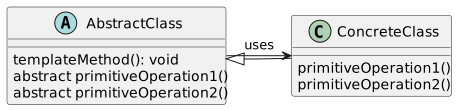
Java Example: Abstract Class
Concrete Implementation
public class Football extends Game {
    @Override
    protected void initialize() {
        System.out.println("Football Game Initialized.");
    }

    @Override
    protected void startPlay() {
        System.out.println("Football Game Started.");
    }

    @Override
    protected void endPlay() {
        System.out.println("Football Game Finished.");
    }
}
Applying the Template Method
The abstract class defines a template method setting up the structure.
Concrete classes implement these steps without changing the structure.
Allows for customization within a fixed framework.
Benefits
Simplifies code maintenance.
Promotes code reusability and scalability.
Enhances standardization of an algorithm.
Hollywood Principle
“Don’t call us, we’ll call you.”
High-level components make decisions about when to call low-level components.
This principle is integral to the Template Method pattern.
Open/Closed Principle
Classes should be open for extension, but closed for modification.
The Template Method pattern adheres to this principle by allowing extension through subclassing.
Advanced Template Method
Incorporates hooks and operations.
Hooks are optional steps in the algorithm, defined in the abstract class.
Concrete classes can override these hooks to add custom behavior.
Template Method with Hooks
@startuml
abstract class AbstractClass {
    templateMethod(): void {
        primitiveOperation1();
        hook();
        primitiveOperation2();
    }
    abstract primitiveOperation1()
    abstract primitiveOperation2()
    hook() { }
}

class ConcreteClass extends AbstractClass {
    primitiveOperation1()
    primitiveOperation2()
    hook()
}

AbstractClass -> ConcreteClass : uses
@enduml
Java Example: Hooks
public abstract class GameWithHooks {
    // Template method with a hook
    public final void play() {
        initialize();
        startPlay();
        if (addNewGameFeature()) {
            addFeature();
        }
        endPlay();
    }

    // Hook
    protected boolean addNewGameFeature() {
        return false;
    }

    // New feature
    protected void addFeature() {}

    // Other methods same as previous Game example
}
Concrete Implementation with Hooks
Composition vs Inheritance
Template Method often uses inheritance.
However, composition can be a more flexible alternative.
This involves defining the algorithm in a separate class and composing it in concrete classes.
Template Method with Composition
Java Example: Composition
Strategy vs Template Method
Both design patterns are about defining algorithms.
Strategy Pattern allows changing the behavior dynamically.
Template Method defines a fixed algorithm structure, with specific steps being variable.
Liskov Substitution Principle
Subtypes must be substitutable for their base types.
Essential for the Template Method to ensure derived classes can replace base classes without affecting the algorithm.
Real-world Application
Template Method is widely used in frameworks and libraries.
It provides a defined structure while allowing users to extend specific functionality.
Examples: Data parsing libraries, game development frameworks, UI rendering engines.
Composite design pattern
Understanding the Composite Pattern
Introduction to design patterns in object-oriented programming
Focus on the Composite pattern
Applications and significance
What is the Composite Pattern?
Structural pattern in object-oriented programming
Simplifies client interaction with complex tree structures
Treats individual objects and compositions uniformly
Composite Pattern - Basic Concept
Composite objects: Objects made up of multiple, smaller objects
Uniform treatment of individual and composite objects
Example: File system directories and files
Importance in Software Design
Reduces complexity in client code
Enhances flexibility in adding new types
Encourages modular, maintainable code design
Key Components of Composite Pattern
Component: Common interface for all objects
Leaf: Basic element of the structure
Composite: A collection of Components
UML Diagram - Basic Structure
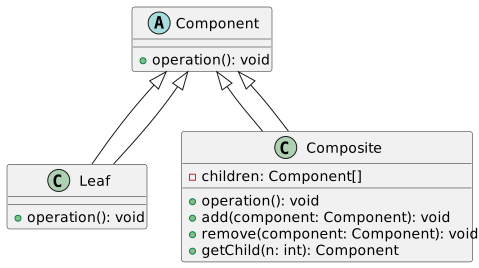
Example in Java - Component Interface
Defines the
operationmethodBase for Leaf and Composite classes
Example in Java - Leaf Class
public class Leaf implements Component {
    public void operation() {
        // Implementation of leaf-specific behavior
    }
}
Simple element with no children
Implements
operationmethod
Example in Java - Composite Class
import java.util.List;
import java.util.ArrayList;

public class Composite implements Component {
    private List<Component> children = new ArrayList<>();

    public void operation() {
        // Implementation for composite operation
        for (Component child : children) {
            child.operation();
        }
    }

    public void add(Component component) {
        children.add(component);
    }

    public void remove(Component component) {
        children.remove(component);
    }

    public Component getChild(int n) {
        return children.get(n);
    }
}
Manages child components
Implements and delegates
operation
Composite Pattern - Key Advantages
Simplifies client interaction with complex structures
Makes it easier to add new types of components
Promotes principle of polymorphism and reusability
Composite Pattern in File Systems
Common real-world application
Directories (Composites) and Files (Leaves)
Simplifies file system navigation and management
Handling Trees with Composite Pattern
Ideal for managing tree-like data structures
Example: GUI components, organizational hierarchies
Uniform operations on nodes and subtrees
Recursion in Composite Pattern
Key feature for handling nested structures
Composite’s methods recursively call children’s methods
Simplifies complex operations
UML Diagram - Detailed View
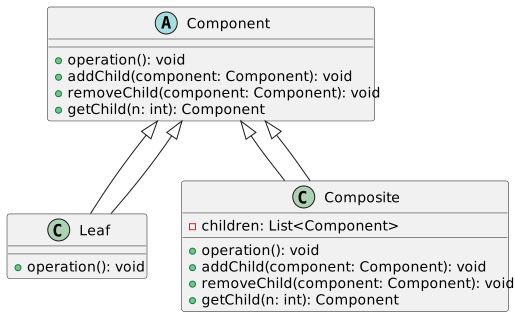
Java Example - Adding Children to Composite
public class Composite implements Component {
    private List<Component> children = new ArrayList<>();

    public void addChild(Component child) {
        children.add(child);
    }

    public void removeChild(Component child) {
        children.remove(child);
    }

    public Component getChild(int index) {
        return children.get(index);
    }
}
Composite manages its children
Allows adding and removing child components
Treating Composites and Leaves Uniformly
Composite and Leaf objects are used interchangeably
Client code remains simple and uniform
Enhances code flexibility and scalability
Composite Pattern - Iterating over Components
Iterators can be used for traversing composites
Simplifies complex tree traversal
Example: Iterating over nested menus in a GUI
Overcoming Composite Pattern Limitations
Handling specific cases for Leaf and Composite
Avoiding excessive reliance on type checking
Designing for future extension and maintenance
Composite vs. Decorator Pattern
Both manage object compositions
Composite: Uniform treatment of composites and leaves
Decorator: Add responsibilities to objects dynamically
Conclusion and Key Takeaways
Composite pattern simplifies complex tree structures
Enhances code reusability and maintainability
Suitable for applications with hierarchical data models
Design Patterns: Decorator vs Composite
Decorator vs Composite
In this session, we’ll explore:
The Decorator Pattern
The Composite Pattern
Key differences and use-cases
The Decorator Pattern
Purpose: Dynamically add responsibilities to objects.
Use-case: Modify behavior at runtime without altering class structure.
Principle: Supports the Open-Closed Principle.
Decorator Pattern: UML Overview
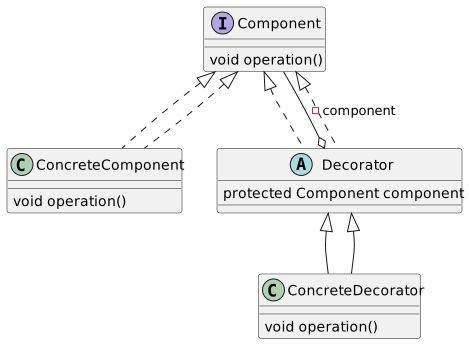
Decorator Pattern: Java Example
interface Component {
    void operation();
}

class ConcreteComponent implements Component {
    public void operation() {
        // Basic operation
    }
}

abstract class Decorator implements Component {
    protected Component component;

    public Decorator(Component component) {
        this.component = component;
    }
}

class ConcreteDecorator extends Decorator {
    public ConcreteDecorator(Component component) {
        super(component);
    }

    public void operation() {
        // Additional behavior
        component.operation();
    }
}
The Composite Pattern
Purpose: Compose objects into tree structures.
Use-case: Represent part-whole hierarchies.
Key Point: Treat individual and composite objects uniformly.
Composite Pattern: UML Overview
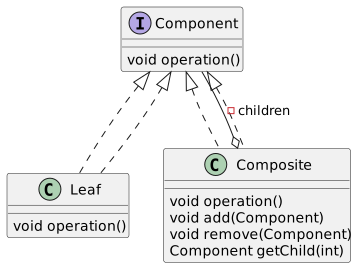
Composite Pattern: Java Example
interface Component {
    void operation();
}

class Leaf implements Component {
    public void operation() {
        // Leaf operation
    }
}

class Composite implements Component {
    private List<Component> children = new ArrayList<>();

    public void add(Component component) {
        children.add(component);
    }

    public void operation() {
        // Composite operation
        for (Component child : children) {
            child.operation();
        }
    }
}
Comparing Patterns
Decorator focuses on adding responsibilities at runtime.
Composite deals with object structures and hierarchy.
Intent and Structure
Decorator Intent: Enhance functionality dynamically.
Composite Intent: Manage a group of objects as a single entity.
Structural Differences: Although visually similar, they serve distinct purposes.
Practical Applications
Decorator: Used in GUI toolkits for adding features like scrolling, borders.
Composite: File systems, UI components where hierarchy is inherent.
Key Difference: Hierarchical Nature
Composite: Naturally hierarchical.
Decorator: Linear in structure; adds functionality layer by layer.
Composite Pattern: Hierarchical Data
Ideal for data that is naturally hierarchical.
Simplifies client code for handling complex structures.
Composite Pattern: Tree Structure
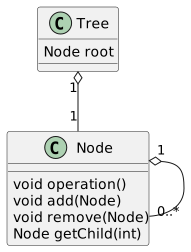
Decorator Pattern: Runtime Flexibility
Provides flexibility to add/remove responsibilities at runtime.
Avoids subclassing and keeps class hierarchy simple.
UML Contrast: Decorator vs Composite
Highlighting structural similarities and differences.
Decorator: Linear.
Composite: Hierarchical.
// Visual comparison of UML diagrams.
Code Comparison: Decorator vs Composite
Decorator adds functionality without altering base class.
Composite manages tree-like structures.
Java examples to illustrate differences.
Use-Case: GUI Development
Decorator: Enhancing GUI components (e.g., adding scroll bars).
Composite: Building complex GUI layouts (e.g., panels containing buttons).
Real-World Example: File Systems
Composite: Representing files and directories.
Demonstrates the need for a unified interface to treat files and directories alike.
Advanced Topic: Polymorphism in Patterns
Both patterns utilize polymorphism.
Composite: Through tree structures.
Decorator: Through wrapping objects.
Conclusion and Further Reading
Understanding these patterns is crucial for effective OOP design.
Recommended Books:
“Design Patterns: Elements of Reusable Object-Oriented Software” by Gang of Four
“Head First Design Patterns”
Explore more patterns for deeper insights into OOP.
Iterator Design Pattern
Introduction to the Iterator Pattern
The Iterator Pattern is a fundamental design pattern in object-oriented programming. It provides a way to access the elements of a collection sequentially without revealing the underlying representation of the collection.
This pattern is essential for:
Providing a uniform way to traverse different data structures.
Decoupling the collection objects and the traversal logic.
Next, we’ll explore what collections are and the challenges faced without the Iterator Pattern.
Concept of Collection in Programming
A collection in programming is an object that groups multiple elements into a single unit. Collections are used to store, retrieve, manipulate, and communicate aggregate data.
Examples of collections:
A list of numbers.
A set of unique values.
A map of key-value pairs.
Understanding collections is key to realizing the importance of the Iterator Pattern.
Problem Without Iterator Pattern
Without the Iterator Pattern, traversing different types of collections can be challenging due to:
Diverse collection structures (arrays, trees, graphs).
The necessity to expose internal representation for iteration.
Increased complexity in client code due to direct traversal logic.
This lack of a unified traversal mechanism leads to less maintainable and more error-prone code.
Iterator Pattern Solution Overview
The Iterator Pattern addresses these challenges by:
Providing a standard way to traverse through a collection.
Allowing the collection to manage the iteration logic internally.
Hiding the internal structure of the collection.
It simplifies client code and enhances maintainability.
UML Diagram of Iterator Pattern
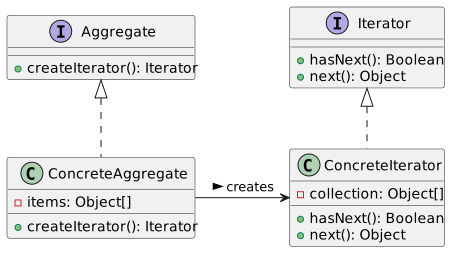
This UML diagram illustrates the core components of the Iterator Pattern:
Iteratorinterface defines the iteration methods.Aggregateinterface provides a method to create an Iterator.ConcreteIteratorimplements the Iterator interface for a specific collection.ConcreteAggregateimplements the Aggregate interface and holds the collection.
Java Code Example: Basic Iterator
Here’s a simple implementation of an Iterator in Java:
public interface Iterator<T> {
    boolean hasNext();
    T next();
}

public class ConcreteIterator<T> implements Iterator<T> {
    private T[] items;
    private int index = 0;

    public ConcreteIterator(T[] items) {
        this.items = items;
    }

    @Override
    public boolean hasNext() {
        return index < items.length;
    }

    @Override
    public T next() {
        return items[index++];
    }
}
This code demonstrates a basic Iterator for an array of generic type T.
Iterator Pattern in Game Development
In game development, the Iterator Pattern can be used to manage collections like:
A list of enemies in a game world.
Inventory items in a player’s backpack.
It allows for efficient traversal and operation on these collections without exposing their internal structure.
UML Diagram: Game World Collection Iteration
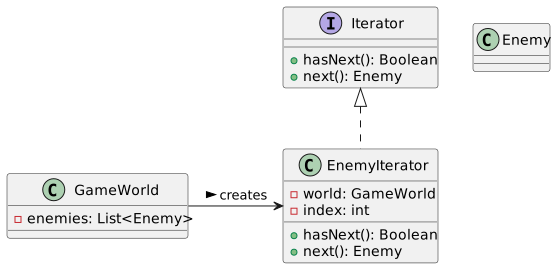
This diagram represents how a GameWorld can create an EnemyIterator to iterate over its collection of enemies.
Java Code Example: Game World Iterator
Implementing an Iterator for a game world’s enemy list:
public class EnemyIterator implements Iterator<Enemy> {
    private GameWorld world;
    private int index;

    public EnemyIterator(GameWorld world) {
        this.world = world;
        this.index = 0;
    }

    @Override
    public boolean hasNext() {
        return index < world.getEnemies().size();
    }

    @Override
    public Enemy next() {
        return world.getEnemies().get(index++);
    }
}
This code snippet shows an Iterator tailored for iterating over enemies in a game world.
Single Responsibility Principle and Iterator Pattern
The Iterator Pattern adheres to the Single Responsibility Principle (SRP) by:
Separating the logic of iterating over a collection from the collection itself.
Allowing each class (iterator and collection) to manage its own responsibilities.
Advanced Iterator Usage in Collections
Advanced usage of iterators allows for more complex operations such as:
Filtering items while iterating.
Applying functions to each item in the collection.
Combining or chaining iterators for complex data structures.
These advanced techniques provide greater flexibility and power in handling collections.
UML Diagram: Advanced Collection Iteration
@startuml
interface Iterator<T> {
  + hasNext(): Boolean
  + next(): T
}

class FilterIterator<T> implements Iterator<T> {
  - wrappedIterator: Iterator<T>
  - filterCondition: Predicate<T>
  + hasNext(): Boolean
  + next(): T
}

Iterator <|.. FilterIterator

@enduml
This diagram shows a FilterIterator that wraps around another iterator, providing additional filtering capabilities based on a given condition.
Java Code Example: Advanced Collection Iterator
Implementing a FilterIterator in Java:
public class FilterIterator<T> implements Iterator<T> {
    private Iterator<T> wrappedIterator;
    private Predicate<T> filterCondition;
    private T nextItem;
    private boolean hasNextItem;

    public FilterIterator(Iterator<T> iterator, Predicate<T> filter) {
        this.wrappedIterator = iterator;
        this.filterCondition = filter;
        advance();
    }

    private void advance() {
        hasNextItem = false;
        while (wrappedIterator.hasNext()) {
            T item = wrappedIterator.next();
            if (filterCondition.test(item)) {
                nextItem = item;
                hasNextItem = true;
                break;
            }
        }
    }

    @Override
    public boolean hasNext() {
        return hasNextItem;
    }

    @Override
    public T next() {
        if (!hasNextItem) {
            throw new NoSuchElementException();
        }
        T item = nextItem;
        advance();
        return item;
    }
}
This code filters items in a collection based on a specified condition while iterating.
Iterator Pattern and Functional Programming
The Iterator Pattern complements functional programming concepts:
Iterators can be used in conjunction with streams and lambda expressions.
Enables operations like
map,filter, andreduceon collections.
This integration brings a declarative approach to collection processing.
Comparison: Foreach Loop and Iterator Pattern
Comparing foreach loop and the Iterator Pattern:
foreachis syntactic sugar over iterators in many languages.Iterators provide more control, e.g., removing elements during iteration.
Understanding this relationship helps in choosing the right iteration mechanism.
UML Diagram: Integrating Iterator with Game Logic
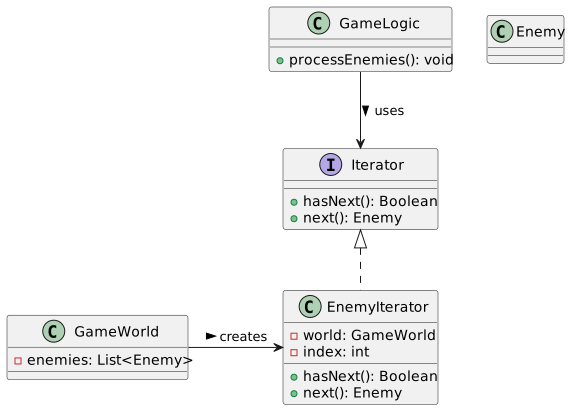
This diagram illustrates the integration of the Iterator Pattern in game logic. The GameLogic class uses an iterator to process enemies in the GameWorld.
Java Code Example: Game Logic Using Iterator
Implementing game logic using the Iterator Pattern:
public class GameLogic {
    private GameWorld world;

    public GameLogic(GameWorld world) {
        this.world = world;
    }

    public void processEnemies() {
        Iterator<Enemy> iterator = world.getEnemyIterator();
        while (iterator.hasNext()) {
            Enemy enemy = iterator.next();
            // Process each enemy
            // e.g., enemy.takeDamage(10);
        }
    }
}
This example shows how to iterate over and process game elements using an iterator.
Iterator Pattern for Infinite Collections
The Iterator Pattern can also be adapted for infinite collections:
Useful for generating infinite sequences or streams.
Allows lazy evaluation: elements are generated only when needed.
This adaptation is powerful for certain types of data processing tasks.
UML Diagram: Infinite Collection Iterator
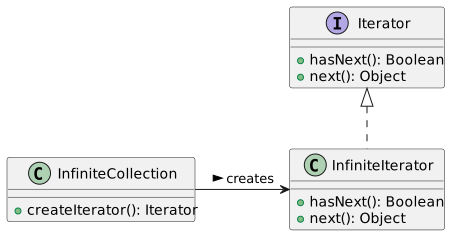
This diagram represents an InfiniteIterator for an InfiniteCollection, illustrating how iteration can continue indefinitely.
Conclusion: Benefits and Considerations of the Iterator Pattern
Benefits of the Iterator Pattern:
Separates collection data and iteration logic.
Facilitates various types of traversals and operations.
Enhances code maintainability and readability.
Considerations:
Overhead of creating iterators.
Complexity in understanding and implementing advanced iterators.
The Iterator Pattern is a versatile tool in a developer’s toolkit, applicable in many scenarios with collections.
State design pattern
State Design Pattern
Objective: Understand the State design pattern in object-oriented programming.
Context: Managing states and behaviors in software systems.
Application: Example of a turnstile system in a subway.
Understanding State Machines
A state machine is a well-studied concept in computer science.
Deals with states and transitions.
Memoryless: Decisions based on current state, not history.
Why State Pattern?
Simplifies State Management: Clear structure for managing states.
Reduces Complexity: Avoids tangled conditional logic.
Adaptability: Easy to modify and add new states.
Basic Concept of State Pattern
Object Behaviors: Change based on its state.
No Direct Dependency: On the history of how the state was reached.
Real-World Example: Turnstile
Scenario: Subway turnstile system.
Focus: Managing turnstile states using State Pattern.
Initial State Diagram of Turnstile
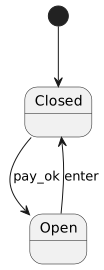
States of a Turnstile
Closed: Default state. Cannot pass through.
Open: Allows passage. Transitions to closed after entry.
Transitions Between States
pay_ok: From Closed to Open.
enter: From Open to Closed.
State Pattern in Java - Basic Structure
public interface State {
    void handleRequest();
}

public class ClosedState implements State {
    public void handleRequest() {
        // Logic for Closed State
    }
}

public class OpenState implements State {
    public void handleRequest() {
        // Logic for Open State
    }
}

public class Turnstile {
    private State state;

    public Turnstile() {
        state = new ClosedState();
    }

    public void setState(State state) {
        this.state = state;
    }

    public void handleRequest() {
        state.handleRequest();
    }
}
Implementing State Transitions in Java
public class ClosedState implements State {
    public void handleRequest() {
        // Transition to Open State
        System.out.println("Payment OK. Gate opening.");
    }
}

public class OpenState implements State {
    public void handleRequest() {
        // Transition to Closed State
        System.out.println("Gate closing after entry.");
    }
}
Handling Payment Failures
Scenario: Payment failure at a closed turnstile.
Transition: Remains in Closed state.
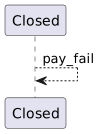
Introduction of Processing State
New State: Processing.
Purpose: Handle payment processing before opening.
Java Implementation of Processing State
Transition Table for Turnstile
| State | Action | Next State |
|---|---|---|
| Closed | pay | Processing |
| Processing | pay_ok | Open |
| Processing | pay_fail | Closed |
| Open | enter | Closed |
Managing State Transitions
Key Concept: Transition based on current state and event.
No Memory: State does not depend on the history of events.
Extending Java Code for New Transitions
Benefits of State Pattern in Complex Systems
Clear State Management: Each state and transition is distinct.
Reduced Complexity: Simplifies complex conditional logic.
Easier Maintenance: Adding new states or transitions is straightforward.
Event Handling in State Pattern
Events: Actions triggering state transitions (e.g., pay, enter).
Handling: Each state defines responses to events.
Visualizing Complex State Transitions
Conclusion and Further Reading
- State Pattern: Powerful tool for managing state in object-oriented design.
- Further Reading: “Design Patterns: Elements of Reusable Object-Oriented Software” by the Gang of Four.
Null Object Pattern
Introduction to Null Object Pattern
Objective: Understand the Null Object Pattern in Object-Oriented Programming
Key Focus: Usage of
null, issues, and polymorphic solutionsReference: Tony Hoare’s concept of
null- A Billion Dollar Mistake
Understanding Null in Programming
Null: Represents the concept of ‘nothingness’
Commonly used in languages to indicate the absence of a value
Example:
Issues with Null:
Can lead to null pointer exceptions
Forces conditional checks in code
Null in Different Languages
- Java:
null - Ruby:
nil - Python:
None - C++/C#:
nullptrorNULL
Each represents the absence of a value, but implementation and handling may vary.
The Problem with Null
Two-Path Dilemma:
Path when variable is not null
Path when variable is null
Leads to increased complexity and conditional logic in code.
Null Object Pattern - Concept
Objective: Avoid explicit null checks
Approach: Use polymorphism to handle ‘null’ behavior
Benefit: Simplifies code by avoiding conditionals
Polymorphism in OOP
Definition: Ability of objects to take on many forms
How it helps:
Avoids conditionals
Simplifies code
Example:
Implementing Null Object Pattern - UML Diagram
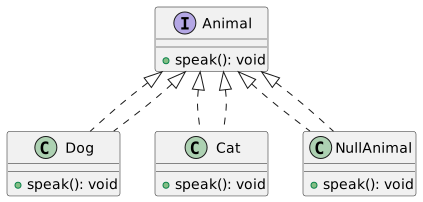
Java Example - Null Object Pattern
Advantages of Null Object Pattern
Reduces Null Checks:
- Avoids repetitive
if (object != null)checks
- Avoids repetitive
Improves Code Clarity:
- Makes the code more readable and maintainable
Enhances Polymorphism:
- Encourages using object-oriented principles
Real-World Example: Strategy Pattern
Context: Use Null Object in Strategy Pattern
Scenario:
Different behaviors for an object
Include a ‘no behavior’ option
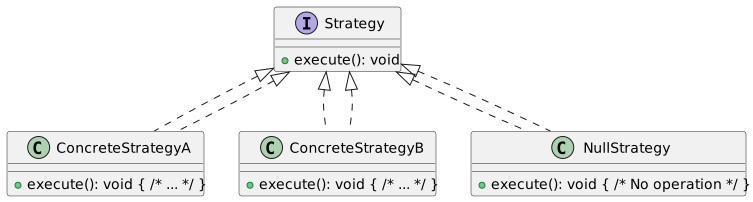
Applying Null Object Pattern in Game Development
Scenario: Handling player movements in a game
Problem: Different states of movement, including immobility
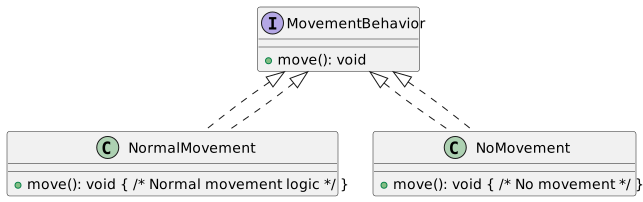
Java Example - Movement Behaviors
Enhancing Flexibility with Null Object Pattern
Benefit: Allows dynamic change of behavior at runtime
Use Case: Changing player’s movement behavior based on game events
Null Object Pattern in UI Design
Scenario: Handling actions of UI elements like buttons
Problem: Some buttons may not always have an action
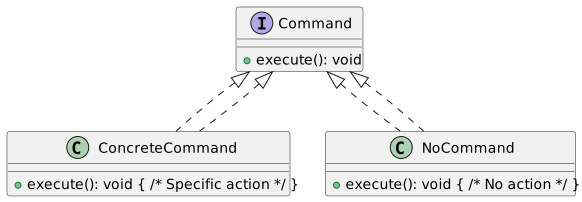
Java Example - UI Commands
Benefits in UI Design
Simplifies Logic: No need to check for null commands
Consistency: Uniform handling of all UI elements
Extensibility: Easy to add new commands or change behavior
Null Object Pattern in Iterators
Scenario: Handling end of collections in iteration
Problem: Avoiding null checks for terminal elements
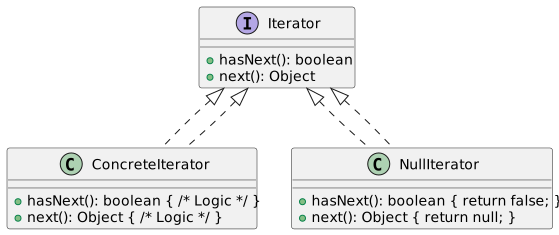
Java Example - Iterators
Advantages of Null Object in Iterators
- Consistent Interface: All iterators implement the same interface
- Simplified Client Code: Removes the need for null checks
- Robust Design: Prevents runtime errors due to null references
Conclusion and Further Thoughts
- Null Object Pattern: A powerful technique in object-oriented design
- Benefits:
- Reduces boilerplate code
- Enhances code readability and maintainability
- Encourages robust and error-free implementations
- Discussion Point:
- Can every conditional involving null be replaced by the Null Object Pattern?
- Explore the balance between using Null Object Pattern and other design principles
- Further Reading:
- “Design Patterns: Elements of Reusable Object-Oriented Software”
- “Head First Design Patterns”
- Tony Hoare’s reflections on the invention of null