Design Pattern: Structural Patterns
Structural Design Patterns
Structural patterns focus on assembling objects and classes into larger structures while maintaining efficiency and flexibility.
All Structural Patterns
| Pattern | Description | Covered |
|---|---|---|
| Adapter | Allows the interface of an existing class to be used as another interface. | ❌ |
| Bridge | Separates an object’s abstraction from its implementation so that they can vary independently. | ❌ |
| Composite | Composes objects into tree structures to represent part-whole hierarchies. | ❌ |
| Decorator | Attaches additional responsibilities to an object dynamically. | ❌ |
| Facade | Provides a unified interface to a set of interfaces in a subsystem. | ❌ |
| Flyweight | Uses sharing to support a large number of fine-grained objects efficiently. | ❌ |
| Proxy | Provides a surrogate or placeholder for another object to control access to it. | ❌ |
Adapter Design Pattern
Introduction to Design Patterns
Understanding the core concepts of software design patterns.
Focus on Adapter, Facade, Proxy, and Decorator patterns.
Reference Book: Head First Design Patterns.
Design Patterns Overview
Patterns as solutions to common software design problems.
Patterns provide a standard terminology and specific to problems.
Four key patterns: Adapter, Facade, Proxy, and Decorator.
The Adapter Pattern
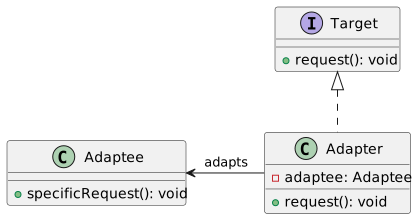
Purpose: To make two incompatible interfaces compatible.
Also known as a “wrapper.”
Use Case: Connecting new code to legacy code or third-party libraries.
Adapter Pattern UML Diagram
Adapter Pattern Java Example
// Target Interface
public interface MediaPlayer {
    void play(String audioType, String fileName);
}

// Adapter Class
public class MediaAdapter implements MediaPlayer {

    AdvancedMediaPlayer advancedMusicPlayer;

    public MediaAdapter(String audioType){
        if(audioType.equalsIgnoreCase("vlc") ){
            advancedMusicPlayer = new VlcPlayer();
        } else if (audioType.equalsIgnoreCase("mp4")){
            advancedMusicPlayer = new Mp4Player();
        }
    }

    @Override
    public void play(String audioType, String fileName) {
        if(audioType.equalsIgnoreCase("vlc")){
            advancedMusicPlayer.playVlc(fileName);
        } else if(audioType.equalsIgnoreCase("mp4")){
            advancedMusicPlayer.playMp4(fileName);
        }
    }
}
The Facade Pattern
Simplifies complex system interactions.
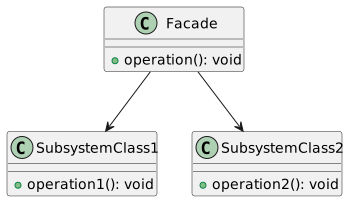
Provides a unified interface to a set of interfaces in a subsystem.
Example: Starting a car (Key Turn → Engine Start, Lights On, etc.)
Facade Pattern UML Diagram
Facade Pattern Java Example
// Facade Class
public class CarEngineFacade {
    private Ignition ignition;
    private FuelInjector fuelInjector;
    private AirFlowController airFlowController;

    public CarEngineFacade() {
        ignition = new Ignition();
        fuelInjector = new FuelInjector();
        airFlowController = new AirFlowController();
    }

    public void startEngine() {
        fuelInjector.on();
        airFlowController.takeAir();
        ignition.ignite();
        // Other complex interactions
    }

    public void stopEngine() {
        fuelInjector.off();
        airFlow

Controller.cutAir();
        ignition.off();
        // Other shutdown interactions
    }
}
The Proxy Pattern
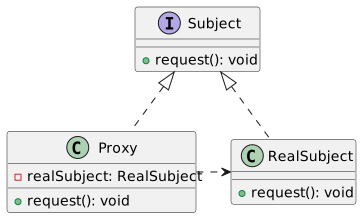
Provides a surrogate or placeholder for another object.
Controls access to the original object.
Use cases: Security, Remote Object Access, Lazy Initialization.
Proxy Pattern UML Diagram
Proxy Pattern Java Example
// RealSubject Class
public class RealImage implements Image {

    private String fileName;

    public RealImage(String fileName){
        this.fileName = fileName;
        loadFromDisk(fileName);
    }

    @Override
    public void display() {
        System.out.println("Displaying " + fileName);
    }

    private void loadFromDisk(String fileName){
        System.out.println("Loading " + fileName);
    }
}

// Proxy Class
public class ProxyImage implements Image {

    private RealImage realImage;
    private String fileName;

    public ProxyImage(String fileName){
        this.fileName = fileName;
    }

    @Override
    public void display() {
        if(realImage == null){
            realImage = new RealImage(fileName);
        }
        realImage.display();
    }
}
The Decorator Pattern
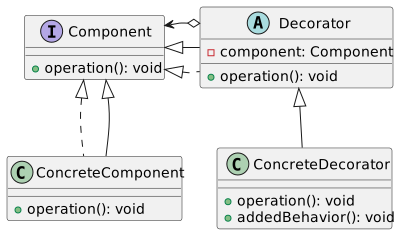
Adds new functionality to an object dynamically.
More flexible than static inheritance.
Example: Adding scrolling to a window in a GUI framework.
Decorator Pattern UML Diagram
Decorator Pattern Java Example
// Component Interface
public interface Shape {
    void draw();
}

// Concrete Component
public class Rectangle implements Shape {

    @Override
    public void draw() {
        System.out.println("Shape: Rectangle");
    }
}

// Decorator Class
public abstract class ShapeDecorator implements Shape {
    protected Shape decoratedShape;

    public ShapeDecorator(Shape decoratedShape){
        this.decoratedShape = decoratedShape;
    }

    public void draw(){
        decoratedShape.draw();
    }
}

// Concrete Decorator
public class RedShapeDecorator extends ShapeDecorator {

    public RedShapeDecorator(Shape decoratedShape) {
        super(decoratedShape);
    }

    @Override
    public void draw() {
        decoratedShape.draw();
        setRedBorder(decoratedShape);
    }

    private void setRedBorder(Shape decoratedShape){
        System.out.println("Border Color: Red");
    }
}
Comparing Design Patterns
Understanding the subtle differences.
Adapter vs. Facade vs. Proxy vs. Decorator.
Each solves specific design issues in object-oriented programming.
Adapter vs. Facade
Adapter: Makes two incompatible interfaces work together.
Facade: Provides a simplified interface to a complex subsystem.
Comparison: Adapter changes the interface; Facade simplifies it.
Facade vs. Proxy
Facade: Simplifies access to a complex system.
Proxy: Controls access to an object, often adding additional functionality.
Comparison: Facade is structural; Proxy often adds behavior.
Proxy vs. Decorator
Proxy: Acts as an intermediary for another object.
Decorator: Adds responsibilities to an object dynamically.
Comparison: Proxy controls access; Decorator enhances functionality.
Adapter vs. Decorator
Adapter: Allows otherwise incompatible interfaces to work together.
Decorator: Enhances an object with additional features.
Comparison: Adapter is about compatibility; Decorator is about enhancement.
Recap and Conclusion
Reviewed key design patterns: Adapter, Facade, Proxy, and Decorator.
Discussed the importance and application of each pattern.
Highlighted differences and specific use cases.
Recommended reading: Head First Design Patterns for deeper understanding.
Facade Pattern
Introduction to Design Patterns
Focus: Facade Pattern
Context: Software Design Patterns
References:
“Design Patterns: Elements of Reusable Object-Oriented Software” by Gang of Four
“Head First Design Patterns”
The Facade Pattern - Overview
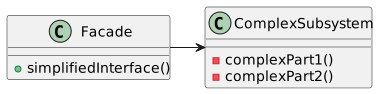
Definition: Simplifies complex system interactions
Purpose: Provide a unified interface to a set of interfaces in a subsystem
Key Principle: High-level abstraction over complex subsystems
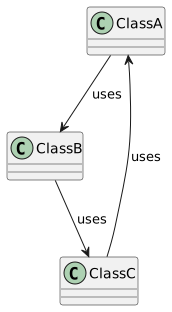
Understanding System Complexity
Scenario: Multiple classes with intricate interactions
Challenge: Managing complex dependencies and interactions
The Client’s Perspective
Client: User of a piece of code, not end-user
Problem: Need to interact with complex subsystems
The Law of Demeter
Principle: Minimize coupling between modules
Rule: Object should only talk to immediate friends
Simplified:
a.B()is allowed, buta.B().C()is not
Single Responsibility Principle
Concept: Each class should have one responsibility
Benefit: Easier maintenance and understanding
The Need for the Facade Pattern
Complexity: High due to multiple, interdependent classes
Solution: Simplify interaction using a facade
Facade Pattern - Basic UML Diagram
Java Example - Facade Pattern
public class ComplexSystemFacade {
    private SubsystemOne one;
    private SubsystemTwo two;
    private SubsystemThree three;

    public ComplexSystemFacade() {
        one = new SubsystemOne();
        two = new SubsystemTwo();
        three = new SubsystemThree();
    }

    public void simplify() {
        one.operation();
        two.operation();
        three.operation();
    }
}

class SubsystemOne { void operation() {} }
class SubsystemTwo { void operation() {} }
class SubsystemThree { void operation() {} }
Advantages of Facade Pattern
Simplicity: Provides simple interface to complex subsystems
Decoupling: Clients interact with facade rather than direct subsystem
Maintainability: Changes in subsystems less likely to affect clients
Proxy Design Pattern
Introduction to Proxy Design Pattern
Proxy Pattern in Software Design
Part of the Structural Patterns
Key Concept: Controlling access to another object
Importance of Design Patterns
Fundamental to software engineering
Provides solutions to common problems
Enhances code maintainability and flexibility
What is the Proxy Pattern?
Acts as a surrogate or placeholder
Manages access to another object
Adds a level of indirection in object access
Types of Proxy Patterns
Remote Proxy: Accessing remote resources
Virtual Proxy: Managing expensive resource creation
Protection Proxy: Controlling access based on permissions
Remote Proxy
Used for interacting with remote resources
Example: Data from a different server
Acts as an intermediary for remote method calls
Virtual Proxy
Controls access to resource-intensive objects
Delays the creation of the object until necessary
Example: Lazy initialization for performance optimization
Protection Proxy
Manages access based on access rights
Ensures only authorized access to an object
Common in scenarios requiring security and permissions
Proxy Pattern - Basic UML Diagram
Proxy Pattern Example in Java
public interface BookParser {
    int getNumberOfPages();
}

public class RealBookParser implements BookParser {
    private String bookContent;

    public RealBookParser(String bookContent) {
        // Expensive parsing operation
        this.bookContent = bookContent;
    }

    @Override
    public int getNumberOfPages() {
        // Return calculated pages
        return 0; // Simplified for example
    }
}

public class LazyBookParserProxy implements BookParser {
    private RealBookParser realParser;
    private String bookContent;

    public LazyBookParserProxy(String bookContent) {
        this.bookContent = bookContent;
    }

    @Override
    public int getNumberOfPages() {
        if (realParser == null) {
            realParser = new RealBookParser(bookContent);
        }
        return realParser.getNumberOfPages();
    }
}
Proxy vs. Real Object
Proxy mimics the real object
Transparent to the client
Adds control layer over real object access
Implementing Remote Proxy in Java
public interface RemoteService {
    String fetchData();
}

public class RemoteServiceImpl implements RemoteService {
    public String fetchData() {
        // Simulates fetching data over network
        return "Data";
    }
}

public class RemoteProxy implements RemoteService {
    private RemoteService remoteService = new RemoteServiceImpl();

    public String fetchData() {
        // Additional control logic can be added here
        return remoteService.fetchData();
    }
}
Implementing Virtual Proxy in Java
public interface Image {
    void display();
}

public class HighResolutionImage implements Image {
    public HighResolutionImage(String imagePath) {
        // Load image from disk - heavy operation
    }

    public void display() {
        // Display the image
    }
}

public class ImageProxy implements Image {
    private HighResolutionImage highResImage;
    private String imagePath;

    public ImageProxy(String imagePath) {
        this.imagePath = imagePath;
    }

    public void display() {
        if (highResImage == null) {
            highResImage = new HighResolutionImage(imagePath);
        }
        highResImage.display();
    }
}
Implementing Protection Proxy in Java
public interface SecureResource {
    void accessResource();
}

public class RealResource implements SecureResource {
    public void accessResource() {
        // Access the secure resource
    }
}

public class SecurityProxy implements SecureResource {
    private RealResource realResource;
    private boolean hasAccess;

    public SecurityProxy(boolean hasAccess) {
        this.realResource = new RealResource();
        this.hasAccess = hasAccess;
    }

    public void accessResource() {
        if (hasAccess) {
            realResource.accessResource();
        } else {
            throw new IllegalStateException("Access Denied");
        }
    }
}
Proxy Pattern in Web Services
Used in API gateways
Manages requests to various microservices
Adds security, load balancing, and caching
Proxy for Database Access Control
Manages database connections
Provides a layer for security and transaction management
Example: Hibernate uses proxies for lazy loading
Proxy for Lazy Initialization
Defers object creation until needed
Reduces initial load time
Common in resource-intensive applications
Proxy for Access Auditing
Logs and monitors access to objects
Useful in security-sensitive applications
Proxy adds logging mechanism transparently
Pros and Cons of Proxy Pattern
Pros
Separation of concerns
Enhanced security
Flexibility and scalability
Cons
Increased complexity
Potential performance overhead
Summary and Conclusion
Proxy pattern is a fundamental structural design pattern
Provides control over access to objects
Versatile with various applications in software development
Requires careful implementation to balance benefits and complexity
Bridge Design Pattern
Design Patterns and the Bridge Pattern
This presentation explores design patterns in software engineering, with a focus on the Bridge Pattern.
Design Patterns: Reusable solutions to common problems in software design.
Bridge Pattern: A structural design pattern that decouples an abstraction from its implementation.
Problem Statement
Before diving into the Bridge pattern, let’s understand the problem it addresses:
Coupling: Tight coupling between an abstraction (interface) and its implementation (concrete classes).
Inflexibility: Difficulty in extending or modifying abstractions and implementations independently.
Bridge Pattern Overview
The Bridge pattern addresses the issues of tight coupling and inflexibility.
Decouples abstraction from its implementation.
Independence: Abstractions and implementations can vary independently.
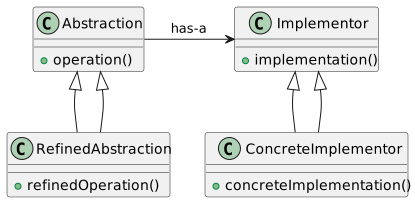
UML Diagram for Bridge Pattern
Key Components
Abstraction: Defines the abstract interface.
Refined Abstraction: Extends the abstraction with additional features.
Implementor: Defines the interface for implementation classes.
Concrete Implementor: Implements the implementor interface.
Example Scenario: Media Display
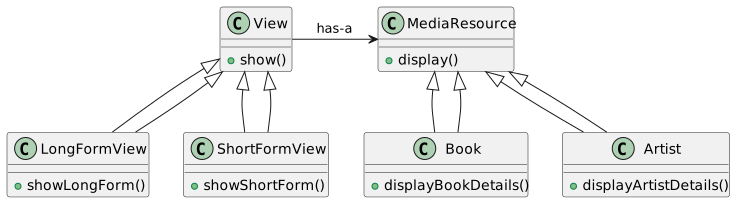
Consider an application displaying various media types (e.g., books, artists) in different formats (e.g., long-form, short-form).
Problem: How to handle different media types and display formats without creating a complex class hierarchy?
Solution: Use the Bridge pattern for flexible and maintainable code.
UML Diagram for Media Display Example
Implementing Bridge in Java - Abstraction and Implementor
Implementing Bridge in Java - Concrete Implementations
Implementing Bridge in Java - Refined Abstractions
// Refined Abstraction (LongFormView.java)
public class LongFormView extends View {
    public LongFormView(MediaResource resource) {
        super(resource);
    }

    public void show() {
        // Show in long-form format
        resource.display();
    }
}

// Refined Abstraction (ShortFormView.java)
public class ShortFormView extends View {
    public ShortFormView(MediaResource resource) {
        super(resource);
    }

    public void show() {
        // Show in short-form format
        resource.display();
    }
}
Advantages of the Bridge Pattern
Flexibility: Allows abstraction and implementation to vary independently.
Extensibility: Easy to extend both hierarchies without affecting each other.
Single Responsibility Principle: Separates high-level logic from low-level details.
Decoupling Concept
The Bridge pattern emphasizes decoupling abstraction (e.g., View) from its implementation (e.g., MediaResource) for greater flexibility and maintainability.
Real-world Analogy
Think of the Bridge pattern like a TV remote (abstraction) and a TV (implementation). The remote can control different TVs (implementations), and TVs can be operated by different remotes (abstractions).
When to Use the Bridge Pattern
When you want to avoid a permanent binding between an abstraction and its implementation.
When both the abstractions and their implementations should be extensible by subclassing.
In applications where implementation details need to be hidden from the client.
Bridge vs. Adapter Pattern
Bridge: Designed up-front to separate abstraction and implementation.
Adapter: Used to make unrelated classes work together after they are designed.
Code Refinement
Refactoring a tightly coupled system using the Bridge pattern leads to more modular and maintainable code. It simplifies future changes and extensions to both abstractions and implementations.
Implementing Bridge Pattern in Java - Example
// Example implementation of the Bridge pattern in Java

// Abstraction
public abstract class Shape {
    protected Color color;

    public Shape(Color color) {
        this.color = color;
    }

    abstract public void draw();
}

// Implementor
public interface Color {
    public void fill();
}

// Refined Abstraction
public class Circle extends Shape {
    public Circle(Color color) {
        super(color);
    }

    public void draw() {
        System.out.println("Drawing Circle");
        color.fill();
    }
}

// Concrete Implementor
public class RedColor implements Color {
    public void fill() {
        System.out.println("Filling with red color");
    }
}
Considerations in Applying the Bridge Pattern
Analyze your application’s requirements to determine if the Bridge pattern is suitable.
Identify the orthogonal dimensions in your design (e.g., UI vs media types).
Use the Bridge pattern when you expect numerous variations in both dimensions.
Limitations of the Bridge Pattern
Complexity: Introduces additional layers which may complicate the code structure.
Overhead: May lead to a performance penalty due to increased indirection.
Suitability: Not ideal for simpler designs where flexibility isn’t a primary concern.
Summary and Conclusion
The Bridge pattern is a powerful tool for managing abstractions and implementations separately.
It offers flexibility, extensibility, and adherence to the Single Responsibility Principle.
Suitable for complex systems where variations in both abstractions and implementations are expected.
Structural Design Patterns (Comparision)
Structural Design Patterns in OOP
This lecture covers a comparison of several key structural design patterns in object-oriented programming:
- Bridge
- Adapter
- Decorator
- Proxy
- Facade
Reference Books: - Head First Design Patterns - Design Patterns: Elements of Reusable Object-Oriented Software
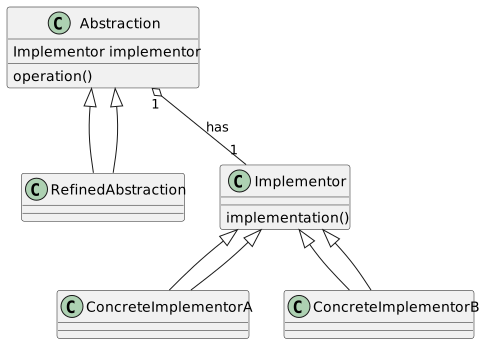
Bridge Pattern
Definition: Decouples an abstraction from its implementation so that the two can vary independently.
UML Diagram:
Bridge Pattern Java Example
// Abstraction
abstract class Abstraction {
    protected Implementor implementor;

    protected Abstraction(Implementor implementor) {
        this.implementor = implementor;
    }

    public abstract void operation();
}

// Refined Abstraction
class RefinedAbstraction extends Abstraction {
    protected RefinedAbstraction(Implementor implementor) {
        super(implementor);
    }

    public void operation() {
        implementor.implementation();
    }
}

// Implementor
interface Implementor {
    void implementation();
}

// Concrete Implementors
class ConcreteImplementorA implements Implementor {
    public void implementation() {
        // Implementation A
    }
}

class ConcreteImplementorB implements Implementor {
    public void implementation() {
        // Implementation B
    }
}
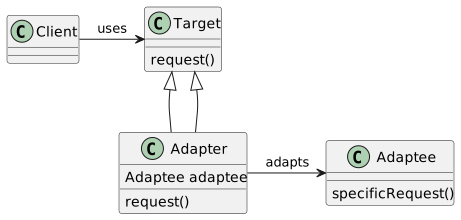
Adapter Pattern
Definition: Allows classes with incompatible interfaces to work together by wrapping its own interface around that of an already existing class.
UML Diagram:
Adapter Pattern Java Example
// Target Interface
interface Target {
    void request();
}

// Adaptee
class Adaptee {
    void specificRequest() {
        // Specific Request
    }
}

// Adapter
class Adapter implements Target {
    private Adaptee adaptee = new Adaptee();

    public void request() {
        adaptee.specificRequest();
    }
}

// Client
class Client {
    private Target target;

    Client(Target target) {
        this.target = target;
    }

    void execute() {
        target.request();
    }
}
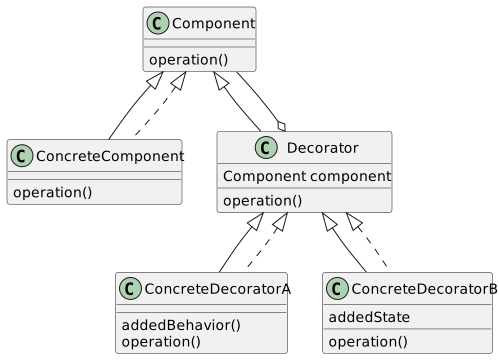
Decorator Pattern
Definition: Attaches additional responsibilities to an object dynamically. Decorators provide a flexible alternative to subclassing for extending functionality.
UML Diagram:
Decorator Pattern Java Example
// Component Interface
interface Component {
    void operation();
}

// Concrete Component
class ConcreteComponent implements Component {
    public void operation() {
        // Original Operation
    }
}

// Decorator
abstract class Decorator implements Component {
    protected Component component;

    public Decorator(Component component) {
        this.component = component;
    }

    public void operation() {
        component.operation();
    }
}

// Concrete Decorators
class ConcreteDecoratorA extends Decorator {
    public ConcreteDecoratorA(Component component) {
        super(component);
    }

    public void operation() {
        super.operation();
        addedBehavior();
    }

    private void addedBehavior() {
        // Additional Behavior A
    }
}

class ConcreteDecoratorB extends Decorator {
    private String addedState;

    public ConcreteDecoratorB(Component component, String addedState) {
        super(component);
        this.addedState = addedState;
    }

    public void operation() {
        super.operation();
        // Use addedState in operation
    }
}
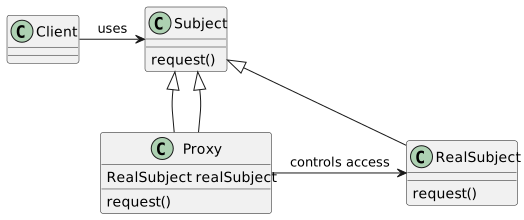
Proxy Pattern
Definition: Provides a surrogate or placeholder for another object to control access to it.
UML Diagram:
Proxy Pattern Java Example
// Subject Interface
interface Subject {
    void request();
}

// Real Subject
class RealSubject implements Subject {
    public void request() {
        // Real request handling
    }
}

// Proxy
class Proxy implements Subject {
    private RealSubject realSubject = new RealSubject();

    public void request() {
        // Access control, then delegate to real subject
        realSubject.request();
    }
}

// Client
class Client {
    private Subject subject;

    Client(Subject subject) {
        this.subject = subject;
    }

    void execute() {
        subject.request();
    }
}
Facade Pattern
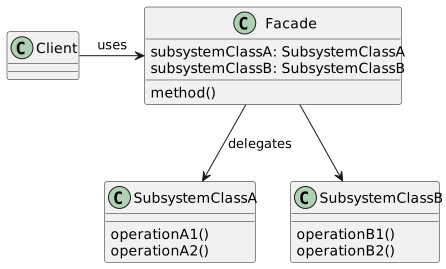
Definition: Provides a unified interface to a set of interfaces in a subsystem, making the subsystem easier to use.
UML Diagram:
Facade Pattern Java Example
// Subsystem Class A
class SubsystemClassA {
    void operationA1() {
        // Operation A1
    }

    void operationA2() {
        // Operation A2
    }
}

// Subsystem Class B
class SubsystemClassB {
    void operationB1() {
        // Operation B1
    }

    void operationB2() {
        // Operation B2
    }
}

// Facade
class Facade {
    private SubsystemClassA subsystemA = new SubsystemClassA();
    private SubsystemClassB subsystemB = new SubsystemClassB();

    void method() {
        subsystemA.operationA1();
        subsystemA.operationA2();
        subsystemB.operationB1();
        subsystemB.operationB2();
    }
}

// Client
class Client {
    private Facade facade = new Facade();

    void execute() {
        facade.method();
    }
}
Comparing Design Patterns
We’ll now compare the structural design patterns discussed, focusing on their intent and structural differences.
Decorator: Adds behavior to an object dynamically.
Adapter: Bridges incompatible interfaces.
Facade: Simplifies complex system interfaces.
Proxy: Controls access to an object.
Bridge: Decouples abstraction from its implementation.
Decorator vs. Adapter
Decorator Pattern:
Adds responsibilities to objects.
Enhances object functionalities.
Uses composition to extend behavior.
Adapter Pattern:
Bridges the gap between incompatible interfaces.
Converts one interface to another.
Does not change the underlying object’s functionality.
Facade vs. Proxy
Facade Pattern: - Provides a simplified interface to a complex system. - Does not change the subsystem behavior. - Often used to encapsulate third-party libraries or complex subsystems.
Proxy Pattern:
Controls access to an object.
Can add additional behavior like lazy initialization, access control, logging.
Acts as a surrogate for the actual object.
Bridge Pattern Unique Traits
Bridge Pattern:
Separates an object’s interface from its implementation.
Allows for independent variation of an abstraction and its implementation.
Useful when both the interface and implementations can have different variations.
Design Pattern Selection Criteria
Choosing the right pattern depends on the problem context:
Complexity Reduction: Facade if simplifying complex interactions is needed.
Interface Compatibility: Adapter when interfacing with incompatible classes.
Dynamic Behavior Extension: Decorator for adding behaviors at runtime.
Access Control or Functionality Extension: Proxy for controlling object access.
Abstraction-Implementation Variation: Bridge when both aspects vary independently.
Real-World Example: Decorator
Scenario: Adding new features to a GUI component without modifying it.
interface GUIComponent {
    void draw();
}

class Window implements GUIComponent {
    public void draw() {
        // Draw window
    }
}

class BorderDecorator extends Decorator {
    public BorderDecorator(GUIComponent component) {
        super(component);
    }

    public void draw() {
        super.draw();
        drawBorder();
    }

    private void drawBorder() {
        // Draw border around window
    }
}
Real-World Example: Adapter
Scenario: Integrating a third-party library with a different interface.
interface MediaPlayer {
    void play(String audioType, String fileName);
}

class AdvancedMediaPlayer {
    void playVLC(String fileName) {
        // Play VLC media
    }

    void playMP4(String fileName) {
        // Play MP4 media
    }
}

class MediaAdapter implements MediaPlayer {
    AdvancedMediaPlayer advancedMusicPlayer;

    MediaAdapter(String audioType) {
        if(audioType.equalsIgnoreCase("vlc") ){
            advancedMusicPlayer = new AdvancedMediaPlayer(); // Assume VLC implementation
        } else if (audioType.equalsIgnoreCase("mp4")){
            advancedMusicPlayer = new AdvancedMediaPlayer(); // Assume MP4 implementation
        }
    }

    public void play(String audioType, String fileName) {
        if(audioType.equalsIgnoreCase("vlc")){
            advancedMusicPlayer.playVLC(fileName);
        } else if(audioType.equalsIgnoreCase("mp4")){
            advancedMusicPlayer.playMP4(fileName);
        }
    }
}
Real-World Example: Facade
Scenario: Simplifying a complex multimedia system.
class AudioSystem {


    void playAudio(String file) {
        // Play audio logic
    }
}

class VideoSystem {
    void playVideo(String file) {
        // Play video logic
    }
}

class MultimediaFacade {
    private AudioSystem audioSystem = new AudioSystem();
    private VideoSystem videoSystem = new VideoSystem();

    void playMedia(String fileType, String fileName) {
        if(fileType.equalsIgnoreCase("audio")) {
            audioSystem.playAudio(fileName);
        } else if(fileType.equalsIgnoreCase("video")) {
            videoSystem.playVideo(fileName);
        }
    }
}

// Client uses Facade for simplified interface
class Client {
    public static void main(String[] args) {
        MultimediaFacade facade = new MultimediaFacade();
        facade.playMedia("audio", "song.mp3");
        facade.playMedia("video", "movie.mp4");
    }
}
Real-World Example: Proxy
Scenario: Implementing access control for a sensitive document.
interface Document {
    void display();
}

class RealDocument implements Document {
    private String fileName;

    RealDocument(String fileName) {
        this.fileName = fileName;
        loadFromDisk(fileName);
    }

    void display() {
        System.out.println("Displaying " + fileName);
    }

    private void loadFromDisk(String fileName) {
        System.out.println("Loading " + fileName);
    }
}

class ProxyDocument implements Document {
    private RealDocument realDocument;
    private String fileName;

    ProxyDocument(String fileName) {
        this.fileName = fileName;
    }

    void display() {
        if(realDocument == null){
            realDocument = new RealDocument(fileName);
        }
        realDocument.display();
    }
}

// Client interacts with ProxyDocument
class Client {
    public static void main(String[] args) {
        Document document = new ProxyDocument("test.txt");
        document.display(); // Loaded and displayed only when needed
    }
}
Real-World Example: Bridge
Scenario: Creating a multi-platform window rendering system.
// Abstraction
interface WindowRenderer {
    void renderWindow(String title);
}

// Refined Abstraction
class IconWindow implements WindowRenderer {
    private WindowImplementor implementor;

    IconWindow(WindowImplementor implementor) {
        this.implementor = implementor;
    }

    public void renderWindow(String title) {
        implementor.drawWindow(title);
        implementor.drawIcon();
    }
}

// Implementor
interface WindowImplementor {
    void drawWindow(String title);
    void drawIcon();
}

// Concrete Implementor A
class LinuxWindowImplementor implements WindowImplementor {
    public void drawWindow(String title) {
        System.out.println("Drawing Window in Linux style: " + title);
    }

    public void drawIcon() {
        System.out.println("Drawing Icon in Linux style");
    }
}

// Concrete Implementor B
class WindowsWindowImplementor implements WindowImplementor {
    public void drawWindow(String title) {
        System.out.println("Drawing Window in Windows style: " + title);
    }

    public void drawIcon() {
        System.out.println("Drawing Icon in Windows style");
    }
}
Decorator Pattern
Object-Oriented Design Patterns
An introduction to the Decorator Pattern in software design.
Understanding its application in Java with practical examples.
Overview of Design Patterns
Design patterns provide solutions to common software design problems.
The Decorator Pattern is one of several key patterns in object-oriented design.
Source: “Head First Design Patterns” book.
The Problem Statement
The need to extend the functionality of objects dynamically.
Avoiding “class explosion” for similar yet distinct objects.
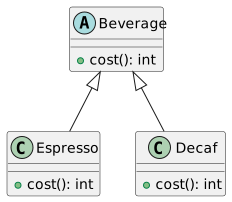
Example: Different types of coffee in a coffee house application.
Basic UML Representation
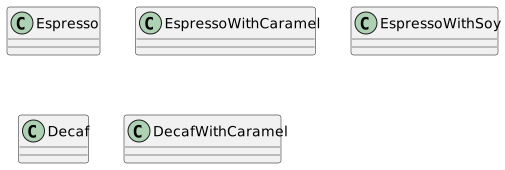
Class Explosion Problem
Multiple classes for each combination of coffee and add-ons (e.g., Espresso with Caramel, Decaf with Soy, etc.).
Results in a large, unmanageable number of subclasses.
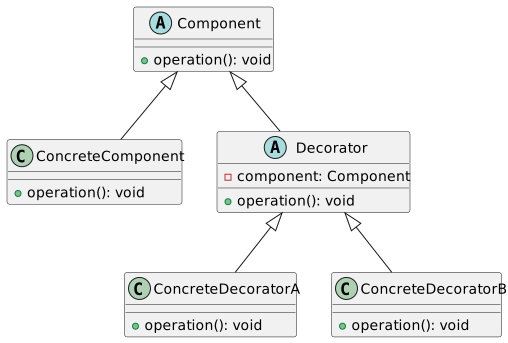
Introduction to Decorator Pattern
A structural pattern for dynamically adding responsibilities to objects.
Avoids subclassing and promotes flexible design.
Decorator Pattern Structure
Applying Decorator Pattern - Example
Consider a coffee ordering system.
Decorators for each add-on (e.g., caramel, soy milk).
Concrete Decorators
public class CaramelDecorator extends AddOnDecorator {
    public CaramelDecorator(Beverage beverage) {
        this

beverage = beverage;
    }

    public int cost() {
        return beverage.cost() + 2; // Adding cost of caramel
    }
}

public class SoyDecorator extends AddOnDecorator {
    public SoyDecorator(Beverage beverage) {
        this.beverage = beverage;
    }

    public int cost() {
        return beverage.cost() + 1; // Adding cost of soy
    }
}
Decorator Pattern in Action
Creating a coffee with add-ons.
Calculating the total cost dynamically.
Benefits of Decorator Pattern
Flexibility in adding new functionality.
Avoids class explosion by using composition over inheritance.
Easier to maintain and extend.
Limitations of Decorator Pattern
Can lead to complex code structures.
Difficulty in debugging, as it introduces layers of abstraction.
Potential performance issues due to increased object creation.
Real-World Example - I/O Streams in Java
Decorator pattern used extensively in Java I/O classes.
Example:
BufferedInputStreamwraps anInputStream.
Comparing with Other Patterns
Composite Pattern
Similar structure but different intent.
Composite builds a hierarchy of objects.
Proxy Pattern
Provides a surrogate or placeholder for another object.
Similar wrapping concept but for different purposes.
UML for Advanced Decorator Example
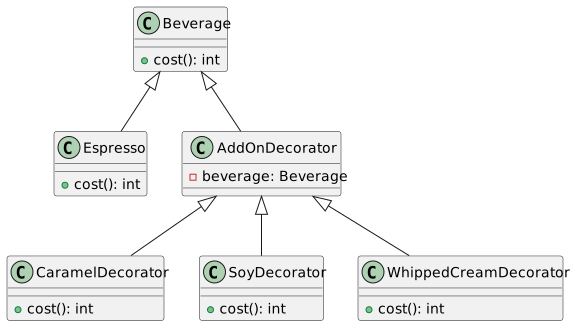
Implementing Whipped Cream Decorator
Dynamically Composing Beverages
Illustrating the dynamic nature of the Decorator Pattern.
Composing beverages with multiple add-ons at runtime.
Decorator Pattern vs Subclassing
Decorator Pattern allows for more flexibility than subclassing.
Avoids rigid class hierarchy.
Promotes loose coupling and adherence to the Open-Closed Principle.
Code Management and Best Practices
Ensure clarity in your decorator and component interfaces.
Avoid overuse of the pattern to prevent excessive complexity.
Consider the impact on system design and maintenance.
Summary and Key Takeaways
Decorator Pattern adds responsibilities to objects dynamically.
Enhances flexibility and reusability in object-oriented design.
Balances between complexity and extensibility.
Applied effectively in scenarios requiring runtime modification of behavior.
Composite design pattern
Understanding the Composite Pattern
Introduction to design patterns in object-oriented programming
Focus on the Composite pattern
Applications and significance
What is the Composite Pattern?
Structural pattern in object-oriented programming
Simplifies client interaction with complex tree structures
Treats individual objects and compositions uniformly
Composite Pattern - Basic Concept
Composite objects: Objects made up of multiple, smaller objects
Uniform treatment of individual and composite objects
Example: File system directories and files
Importance in Software Design
Reduces complexity in client code
Enhances flexibility in adding new types
Encourages modular, maintainable code design
Key Components of Composite Pattern
Component: Common interface for all objects
Leaf: Basic element of the structure
Composite: A collection of Components
UML Diagram - Basic Structure
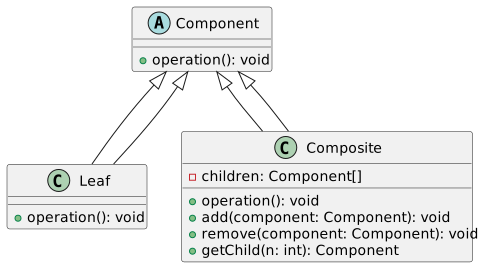
Example in Java - Component Interface
Defines the
operationmethodBase for Leaf and Composite classes
Example in Java - Leaf Class
public class Leaf implements Component {
    public void operation() {
        // Implementation of leaf-specific behavior
    }
}
Simple element with no children
Implements
operationmethod
Example in Java - Composite Class
import java.util.List;
import java.util.ArrayList;

public class Composite implements Component {
    private List<Component> children = new ArrayList<>();

    public void operation() {
        // Implementation for composite operation
        for (Component child : children) {
            child.operation();
        }
    }

    public void add(Component component) {
        children.add(component);
    }

    public void remove(Component component) {
        children.remove(component);
    }

    public Component getChild(int n) {
        return children.get(n);
    }
}
Manages child components
Implements and delegates
operation
Composite Pattern - Key Advantages
Simplifies client interaction with complex structures
Makes it easier to add new types of components
Promotes principle of polymorphism and reusability
Composite Pattern in File Systems
Common real-world application
Directories (Composites) and Files (Leaves)
Simplifies file system navigation and management
Handling Trees with Composite Pattern
Ideal for managing tree-like data structures
Example: GUI components, organizational hierarchies
Uniform operations on nodes and subtrees
Recursion in Composite Pattern
Key feature for handling nested structures
Composite’s methods recursively call children’s methods
Simplifies complex operations
UML Diagram - Detailed View
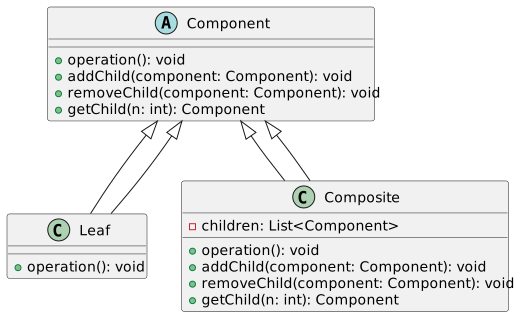
Java Example - Adding Children to Composite
public class Composite implements Component {
    private List<Component> children = new ArrayList<>();

    public void addChild(Component child) {
        children.add(child);
    }

    public void removeChild(Component child) {
        children.remove(child);
    }

    public Component getChild(int index) {
        return children.get(index);
    }
}
Composite manages its children
Allows adding and removing child components
Treating Composites and Leaves Uniformly
Composite and Leaf objects are used interchangeably
Client code remains simple and uniform
Enhances code flexibility and scalability
Composite Pattern - Iterating over Components
Iterators can be used for traversing composites
Simplifies complex tree traversal
Example: Iterating over nested menus in a GUI
Overcoming Composite Pattern Limitations
Handling specific cases for Leaf and Composite
Avoiding excessive reliance on type checking
Designing for future extension and maintenance
Composite vs. Decorator Pattern
Both manage object compositions
Composite: Uniform treatment of composites and leaves
Decorator: Add responsibilities to objects dynamically
Conclusion and Key Takeaways
Composite pattern simplifies complex tree structures
Enhances code reusability and maintainability
Suitable for applications with hierarchical data models
Design Patterns: Decorator vs Composite
Decorator vs Composite
In this session, we’ll explore:
The Decorator Pattern
The Composite Pattern
Key differences and use-cases
The Decorator Pattern
Purpose: Dynamically add responsibilities to objects.
Use-case: Modify behavior at runtime without altering class structure.
Principle: Supports the Open-Closed Principle.
Decorator Pattern: UML Overview
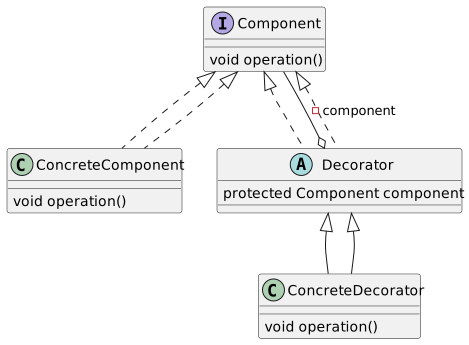
Decorator Pattern: Java Example
interface Component {
    void operation();
}

class ConcreteComponent implements Component {
    public void operation() {
        // Basic operation
    }
}

abstract class Decorator implements Component {
    protected Component component;

    public Decorator(Component component) {
        this.component = component;
    }
}

class ConcreteDecorator extends Decorator {
    public ConcreteDecorator(Component component) {
        super(component);
    }

    public void operation() {
        // Additional behavior
        component.operation();
    }
}
The Composite Pattern
Purpose: Compose objects into tree structures.
Use-case: Represent part-whole hierarchies.
Key Point: Treat individual and composite objects uniformly.
Composite Pattern: UML Overview
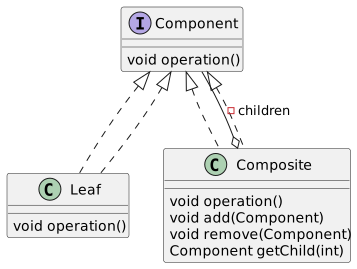
Composite Pattern: Java Example
interface Component {
    void operation();
}

class Leaf implements Component {
    public void operation() {
        // Leaf operation
    }
}

class Composite implements Component {
    private List<Component> children = new ArrayList<>();

    public void add(Component component) {
        children.add(component);
    }

    public void operation() {
        // Composite operation
        for (Component child : children) {
            child.operation();
        }
    }
}
Comparing Patterns
Decorator focuses on adding responsibilities at runtime.
Composite deals with object structures and hierarchy.
Intent and Structure
Decorator Intent: Enhance functionality dynamically.
Composite Intent: Manage a group of objects as a single entity.
Structural Differences: Although visually similar, they serve distinct purposes.
Practical Applications
Decorator: Used in GUI toolkits for adding features like scrolling, borders.
Composite: File systems, UI components where hierarchy is inherent.
Key Difference: Hierarchical Nature
Composite: Naturally hierarchical.
Decorator: Linear in structure; adds functionality layer by layer.
Composite Pattern: Hierarchical Data
Ideal for data that is naturally hierarchical.
Simplifies client code for handling complex structures.
Composite Pattern: Tree Structure
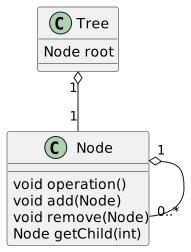
Decorator Pattern: Runtime Flexibility
Provides flexibility to add/remove responsibilities at runtime.
Avoids subclassing and keeps class hierarchy simple.
UML Contrast: Decorator vs Composite
Highlighting structural similarities and differences.
Decorator: Linear.
Composite: Hierarchical.
// Visual comparison of UML diagrams.
Code Comparison: Decorator vs Composite
Decorator adds functionality without altering base class.
Composite manages tree-like structures.
Java examples to illustrate differences.
Use-Case: GUI Development
Decorator: Enhancing GUI components (e.g., adding scroll bars).
Composite: Building complex GUI layouts (e.g., panels containing buttons).
Real-World Example: File Systems
Composite: Representing files and directories.
Demonstrates the need for a unified interface to treat files and directories alike.
Advanced Topic: Polymorphism in Patterns
Both patterns utilize polymorphism.
Composite: Through tree structures.
Decorator: Through wrapping objects.
Conclusion and Further Reading
Understanding these patterns is crucial for effective OOP design.
Recommended Books:
“Design Patterns: Elements of Reusable Object-Oriented Software” by Gang of Four
“Head First Design Patterns”
Explore more patterns for deeper insights into OOP.
Pattern Interrelation and Usage
Decorator is often used for small, dynamic, and single-object modifications.
Adapter is ideal for making existing classes work with others without modifying their source code.
Facade simplifies complex systems, providing a unified interface.
Proxy is used for controlled access or additional layer, like lazy initialization or security.
Bridge decouples abstraction from implementation, providing flexibility in large-scale applications.