Design Pattern: Creational Patterns
Dr. Ashish Sai
Design Patterns
Design Patterns
Design patterns are typical solutions to recurring design problems in software engineering.
Essence of Design Patterns
- Blueprints: Pre-made blueprints for solving recurring design issues.
- Customizable: Adaptable to solve specific problems in your code.
Design Patterns
Patterns: Not Just Code
- Conceptual: More concept than the actual code.
- Problem-Solving Tools: Time-tested solutions to frequent software design issues.
Differentiating Patterns from Algorithms
Algorithms: Step-by-step procedures for solving problems, like cooking recipes.
Design Patterns: Abstract, flexible schemes for software structure, similar to architectural blueprints.
- The same pattern can result in different code across different applications.
The Purpose Behind Design Patterns
- Creational Patterns: Simplify object creation, making a system independent of how its objects are created, composed, and represented.
The Purpose Behind Design Patterns
- Structural Patterns: Help to form larger structures while keeping the system flexible and efficient. They ensure that changing one part of the system does not affect other parts.
The Purpose Behind Design Patterns
- Behavioral Patterns: Enhance communication between objects and help in the assignment of responsibilities between objects, making the interaction more flexible and efficient.
The Origins and Evolution of Design Patterns
- Initially described by Christopher Alexander in the context of town and building planning.
The Origins and Evolution of Design Patterns
- Adaptation to Software: Introduced by the “Gang of Four” (GoF) - Erich Gamma, John Vlissides, Ralph Johnson, and Richard Helm - in “Design Patterns: Elements of Reusable Object-Oriented Software.”
Discovery and Documentation of Patterns
Recognition: Identifying recurring solutions.
Naming & Sharing: Naming and documenting solutions for others to use.
Community Involvement: A community-driven process with practitioner contributions.
The Inception of Design Patterns
Patterns emerge when a solution is repeated across various projects, eventually gaining a name and detailed description.
The Significance of Learning Design Patterns
Problem-Solving Toolkit: Offers proven solutions for common problems, improving problem-solving skills.
Design Vocabulary: Creates a common language for developers, enhancing communication and collaboration.
Best Practices: Promotes best practices in software design for maintainable and scalable code.
Criticism of Design Patterns
If all you have is a hammer, everything looks like a nail.
Understanding the limitations and appropriate use of design patterns is crucial.
Criticism of Design Patterns
- Language Limitations: Patterns may arise from a language’s shortcomings, like Strategy patterns being replaced by lambdas in modern languages.
- Efficiency Concerns: Misapplying patterns can lead to complex, inefficient solutions. Context matters.
- Overuse by Novices: Inexperienced use can lead to overcomplicated code when simpler options exist.
Classifying Design Patterns
- By Complexity and Detail:
- Idioms: Specific to a programming language, addressing low-level issues and specifics.
- Architectural Patterns: High-level patterns that guide the overall structure and organization of software systems.
Classifying Design Patterns
- By Purpose:
- Creational Patterns: Concerned with object creation mechanisms.
- Structural Patterns: Deal with object composition and the formation of larger structures.
- Behavioral Patterns: Focus on communication between objects and responsibilities.
Creational Design Patterns
Creational Design Patterns
Creational patterns are fundamental for object creation in software design. They provide mechanisms that increase flexibility and reuse of existing code.
Five Main Creational Patterns
| Pattern | Description | Covered |
|---|---|---|
| Factory Method | Delegates the creation of objects to subclasses, promoting flexibility and integration. | ✅ |
| Abstract Factory | Creates families of related or dependent objects without specifying their concrete classes. | ✅ |
| Builder | Constructs complex objects step by step, allowing the creation process to create different types and representations of an object. | ❌ |
| Prototype | Creates new objects by copying an existing object, known as the prototype. | ❌ |
| Singleton | Ensures a class has only one instance while providing a global point of access to it. | ✅ |
Factory Method Pattern
Introduction to Factory Pattern
- Essential design pattern in object-oriented programming
- Focuses on object creation mechanisms
- Aims to create objects in a manner suitable to the situation
Types of Factory Pattern
- Simple Factory
- Factory Method
- Abstract Factory
Note: Simple Factory is not a true design pattern
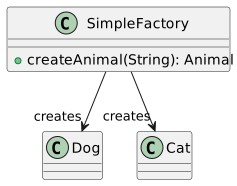
Simple Factory
- Not considered a true design pattern
- Basic level of abstraction in object creation
Simple Factory UML Diagram
Factory Method Pattern
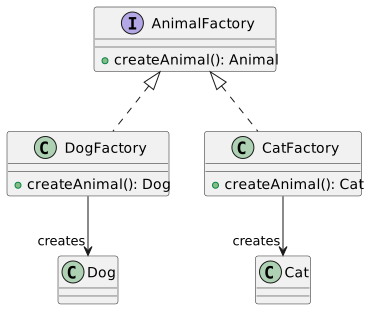
- Defines an interface for creating objects
- Delegates instantiation to subclasses
- Offers flexibility and encapsulation
Key Concepts
- Polymorphism
- Encapsulation
- Abstraction
Factory Method Example in Java
Factory Method UML Diagram
Abstract Factory Pattern
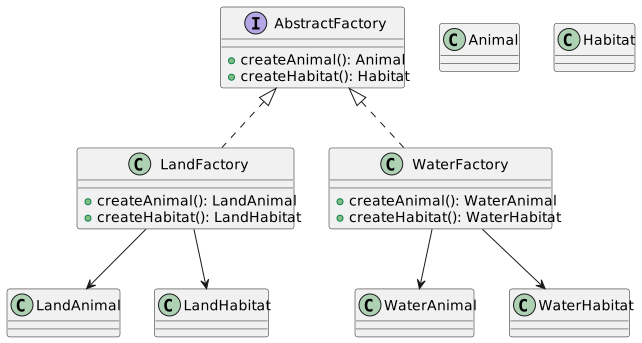
- Provides an interface for creating families of related objects
- Ensures that related objects are created together
When to Use
When the system needs to be independent of how its objects are created
When the family of related objects is designed to be used together
Abstract Factory Example in Java
Abstract Factory UML Diagram
Polymorphism in Factory Pattern
- Core concept in Factory Pattern
- Allows objects to be treated as instances of their parent type
Benefits
- Flexibility in object creation
- Easier maintenance and extension
Polymorphism Example
Dependency Injection
- Related concept in object-oriented design
- Objects are passed their dependencies rather than creating them internally
Use in Factory Pattern
- Simplifies creation of objects
- Increases flexibility and testability
Dependency Injection Example
Encapsulation in Factory Pattern
- Hides the creation logic of objects
- Exposes only the necessary information
Benefits
- Reduces complexity
- Enhances modularity and maintainability
Encapsulation Example
Factory Pattern in Game Development
- Widely used in game design
- Helps manage and create game entities dynamically
Example
- Use in creating different types of enemies or levels
Game Development Example
Advantages of the Factory Pattern
- Simplifies object creation
- Promotes code reuse and separation of concerns
- Increases system modularity and scalability
Key Points
- Reduces direct dependencies
- Enhances flexibility and maintainability
Factory Pattern in Complex Systems
- Ideal for systems with complex object creation
- Useful in scenarios requiring various instances of classes
Application Areas
- Software toolkits and frameworks
- User interface libraries
- Complex business logic
Summary and Conclusion
- Factory Pattern is a fundamental design pattern in OOP
- Offers solutions for complex object creation
- Encourages clean, maintainable, and scalable code
Final Thoughts
- Essential for any software developer’s toolkit
- Understanding and applying the Factory Pattern leads to better software design
Abstract Factory Pattern
Factory Method Pattern
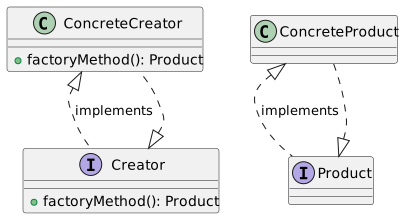
The Factory Method Pattern defines an interface for creating an object but lets subclasses decide which class to instantiate.
It allows a class to defer instantiation to subclasses.
Key Components:
Creator (Interface or Abstract Class)
Concrete Creator
Product (Interface or Abstract Class)
Concrete Product
Factory Method Pattern: UML Diagram
Factory Method Pattern: Java Example
Abstract Factory Pattern Introduction
The Abstract Factory Pattern provides an interface for creating families of related or dependent objects without specifying their concrete classes.
It’s a step above the Factory Method Pattern.
Useful for creating a suite of related products.
Abstract Factory vs Factory Method
Factory Method: Creates objects through inheritance.
Abstract Factory: Creates families of related objects without specifying their concrete classes.
Focus on group of products rather than one.
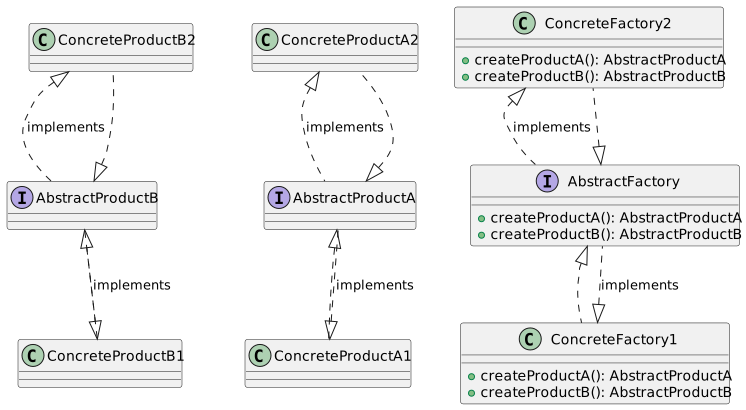
Abstract Factory Pattern: Key Components
- Abstract Factory: Interface for creating a family of products.
- Concrete Factory: Implements the operations to create concrete products.
- Abstract Product: Declares an interface for a type of product object.
- Concrete Product: Implements the Abstract Product interface.
Abstract Factory Pattern: UML Diagram
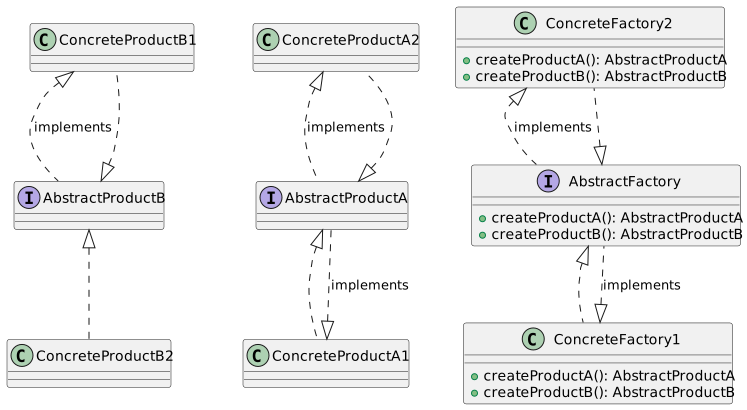
Abstract Factory Pattern: UML Diagram
Abstract Factory Pattern: Java Example
public interface AbstractFactory {
    AbstractProductA createProductA();
    AbstractProductB createProductB();
}

public class ConcreteFactory1 implements AbstractFactory {
    public AbstractProductA createProductA() {
        return new ConcreteProductA1();
    }
    public AbstractProductB createProductB() {
        return new ConcreteProductB1();
    }
}

// Similar implementation for ConcreteFactory2, ConcreteProductA2, and ConcreteProductB2
Abstract Factory Pattern: Product Families
- Abstract Factory enables the creation of products that are related or dependent.
- Ensures consistency within a product family.
- Example:
- A UI toolkit could provide a factory for each platform (Windows, MacOS, Linux), where each factory produces compatible components.
Abstract Factory: Handling Complex Creations
Abstract Factory is ideal for complex creation processes involving multiple steps.
It can manage dependencies between different products.
Example: Creating a cohesive UI theme (Dark, Light) with compatible components (Buttons, Labels).
Abstract Factory: Dependency Management
Abstract Factory assists in managing dependencies between objects.
Ensures that objects which are meant to work together are compatible.
Example: Ensuring that MacOS Alert Dialogues use MacOS Buttons, not Windows Buttons.
Abstract Factory Pattern: Extended UML Diagram
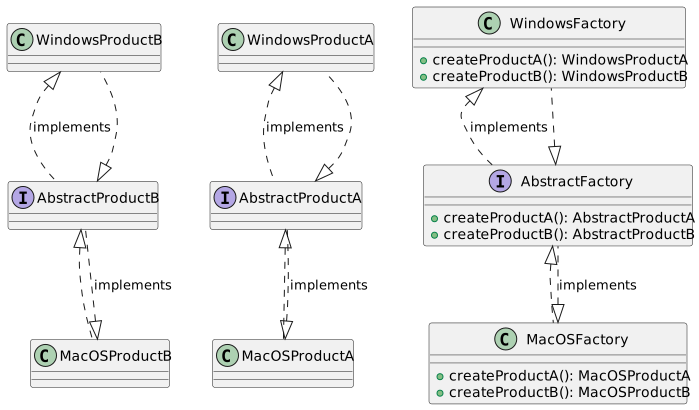
Cross-Platform UI Example with Abstract Factory
Use Abstract Factory for platform-independent UI creation.
Factories for each platform (MacOS, Windows, Linux) ensure compatible UI elements.
Streamlines development for multi-platform applications.
Abstract Factory: Ensuring Consistency
Guarantees that created objects are consistent with each other.
Prevents mixing incompatible components.
Example: A MacOS alert box will not mistakenly use a Windows button.
Abstract Factory: Flexibility in Creation
Offers flexibility in creating families of objects.
Factories can be easily switched to change the family of created objects.
Useful in scenarios like switching themes or platforms.
Abstract Factory: Example in Theme Switching
Ideal for scenarios like theme switching in an application.
Dark and Light theme factories create UI components with consistent styling.
Simplifies dynamic theme changes in the application.
Abstract Factory: Benefits and Drawbacks
Benefits
Consistency: Ensures products from a family are compatible.
Flexibility: Easy to introduce new families of products.
Scalability: Simplifies adding new products to existing families.
Drawbacks
Complexity: Can be overkill for simple scenarios.
Modifiability: Changing one part of the system can affect others.
Abstractness: High level of abstraction can be challenging to understand.
Advanced Use: Abstract Factory with Dependency Injection
Abstract Factory can be combined with Dependency Injection for greater flexibility.
Factories are injected into classes that need to create objects.
This approach decouples the creation logic even further from usage.
Practical Application: UI Control Factory
- Abstract Factory is used to create UI controls like buttons, menus, windows.
- Example: A
UIControlFactoryinterface with methods likecreateButton(),createWindow(). - Different concrete factories implement this interface for different platforms or themes.
Code Example: Theme-Specific UI Controls
public interface UIControlFactory {
    Button createButton();
    Window createWindow();
}

public class DarkThemeUIControlFactory implements UIControlFactory {
    public Button createButton() {
        return new DarkThemeButton();
    }
    public Window createWindow() {
        return new DarkThemeWindow();
    }
}

public class LightThemeUIControlFactory implements UIControlFactory {
    public Button createButton() {
        return new LightThemeButton();
    }
    public Window createWindow() {
        return new LightThemeWindow();
    }
}
Conclusion: Abstract Factory in Design Patterns
- Abstract Factory is a powerful pattern for creating families of objects.
- Encourages consistency and flexibility in your software design.
- While complex, it’s invaluable for applications requiring scalability and modular design.
- Remember to balance the use of design patterns with the specific needs of your application.
Singleton Pattern
What is Singleton Pattern?
The Singleton Pattern is a design pattern that:
- Ensures a class has only one instance
- Provides a global point of access to that instance
This pattern is useful for coordinating actions across a system.
Singleton Pattern
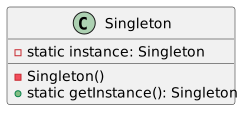
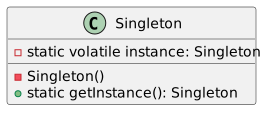
Singleton Pattern in Java - Basic Structure
Why Use Singleton?
- Resource Management: Singleton can be used to manage resources like database connections.
- Consistency: Ensures that a class has only one instance, maintaining a consistent state across the application.
- Global Access: Provides a universally accessible instance.
The Controversy Around Singleton
- Global State: Singleton can introduce a global state in an application, leading to hidden dependencies.
- Code Smell: Some argue that Singleton is a code smell, suggesting poor design.
- Testing Difficulty: Singletons can make unit testing difficult due to their global state.
Implementing Singleton - Thread Safety
Thread safety is crucial in Singleton implementation, especially in multithreaded applications.
Thread-Safe Singleton
Use Case: Singleton in a Chat Application
Imagine a chat application where you initially think there’s only one chat room.
- Singleton Chat: Initially, the chat is designed as a Singleton.
- Evolution: Over time, the need for multiple chat rooms becomes evident.
This example illustrates how the assumption of a single instance can limit application scalability.
Singleton Pattern - Breaking the Single Instance Assumption
Singleton assumes you’ll never need more than one instance, but this isn’t always true.
- Scalability: As applications grow, the need for multiple instances of a class can arise.
- Flexibility: Design patterns should not restrict future enhancements or changes.
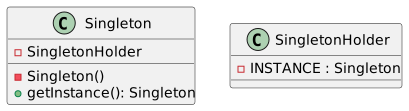
Advanced Singleton Implementation
Let’s delve deeper into the Singleton pattern with an advanced implementation.
public class Singleton {
    private static class SingletonHolder {
        private static final Singleton INSTANCE = new Singleton();
    }

    private Singleton() {
        // Private Constructor
    }

    public static Singleton getInstance() {
        return SingletonHolder.INSTANCE;
    }
}
This approach uses a static inner class for lazy initialization and is thread-safe without synchronization.
UML Diagram - Advanced Singleton
Singleton Pattern – Alternative: Dependency Injection
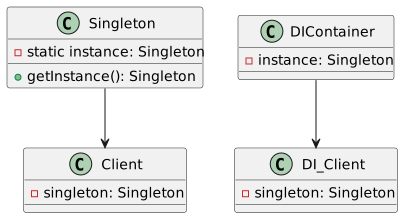
Instead of using Singleton, consider Dependency Injection (DI) for better testability and flexibility.
- DI Frameworks: Such as Spring or Guice
- Advantages: Easier testing, decouples object creation and business logic
Singleton Pattern and the Single Responsibility Principle
Singleton often violates the Single Responsibility Principle (SRP) by:
- Managing its own instance creation and lifecycle.
- Performing the unique business logic of its class.
Consider splitting these responsibilities for better design.
The Problem with Globals in Singleton
Singleton introduces globals, which can lead to:
- Unpredictable Side Effects: Global state changes are hard to track and debug.
- Coupling: Tight coupling of different parts of the application.
Singleton vs. Dependency Injection
Testing Challenges with Singleton
Singletons pose challenges for unit testing:
- Mocking Difficulties: Hard to replace with mock implementations.
- State Persistence: State persists between tests, leading to potential test interference.
Real-World Applications of Singleton
Singletons are often used in scenarios like:
- Configuration Settings: Managing app-wide configurations.
- Database Connection Pools: Managing a shared resource pool.
Conclusion and Further Reading
- Singleton is a powerful, yet controversial pattern.
- Be mindful of its limitations and alternatives.
- Further Reading: Explore “Head First Design Patterns” for deeper insights.
Criticisms of Singleton Pattern
Singleton pattern faces several criticisms:
- Inflexibility: Hard to adapt when the assumption of a single instance no longer holds.
- Hidden Dependencies: Creates hidden dependencies in code, making it less modular.
- Scalability Issues: Singleton can become a bottleneck in large, scalable applications.
Singleton Pattern and Global State
The Singleton pattern and its impact on global state:
- Global State Management: Singleton manages a global state, which can be problematic.
- Reasoning About Code: Global state makes it harder to understand and maintain code.
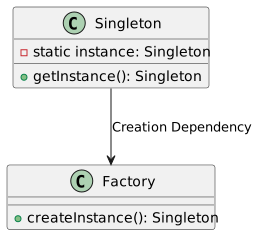
Singleton vs. Factory Pattern
Summary and Key Takeaways
- Singleton Pattern: Ensures a single instance and global access.
- Use with Caution: Be aware of its limitations in terms of flexibility, testability, and scalability.
- Alternatives: Consider other patterns and approaches for better design outcomes.