Tutorial Sheet 4
Important: Some of the diagrams may not have rendered perfectly well (there may be multiple arrows), if that is the case, please consult the diagrams from the lecture notes.
Multiple Choice Questions
- B. To simplify object creation and increase flexibility
- B. Factory Method Pattern
- C. Flexibility in object creation
- C. Functional Patterns
- B. A way to create families of related objects
- A. Factory Method Pattern
- B. It hides the creation logic of objects
- A. Inheritance
- C. Inheritance
- B. An abstract class or interface
- B. Create different families of related products
- B. Delegating instantiation to subclasses
Short Answer Questions
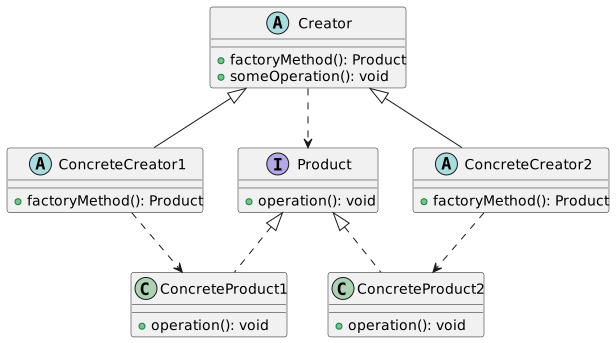
- Explain the Factory Method Pattern with appropriate UML diagrams.
The Factory Method Pattern is a creational design pattern that provides an interface for creating objects in a superclass, but allows subclasses to alter the type of objects that will be created.
- Discuss the differences between the Factory Method and Abstract Factory Patterns citing examples.
The Factory Method Pattern deals with creating objects of a single type, while the Abstract Factory Pattern deals with creating families of related objects.
In the Factory Method Pattern, subclasses are responsible for creating instances of concrete products. For example, in a document management system, a TextDocumentCreator could create TextDocument objects, and a SpreadsheetDocumentCreator could create SpreadsheetDocument objects.
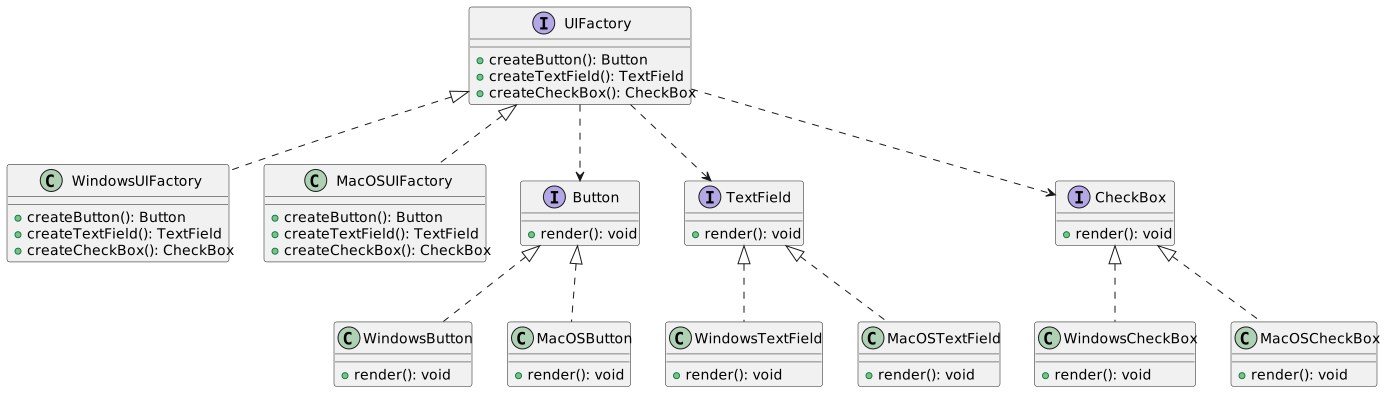
On the other hand, the Abstract Factory Pattern provides an interface for creating families of related or dependent objects without specifying their concrete classes. For example, in a cross-platform UI toolkit, an WindowsUIFactory could create WindowsButton, WindowsTextField, and WindowsCheckBox objects, while a MacOSUIFactory could create MacOSButton, MacOSTextField, and MacOSCheckBox objects.
- Explain the concept of polymorphism in the context of the Factory Method Pattern with a code snippet.
Polymorphism is a key concept in the Factory Method Pattern, allowing subclasses to override the factory method and create different types of objects. Here’s an example in Java:
// Product interface
interface Document {
    void open();
    void save();
    // ...
}

// Concrete products
class TextDocument implements Document {
    // ...
}

class SpreadsheetDocument implements Document {
    // ...
}

// Abstract creator
abstract class DocumentCreator {
    public abstract Document createDocument();

    public void openDocument() {
        Document doc = createDocument();
        doc.open();
    }
}

// Concrete creators
class TextDocumentCreator extends DocumentCreator {
    @Override
    public Document createDocument() {
        return new TextDocument();
    }
}

class SpreadsheetDocumentCreator extends DocumentCreator {
    @Override
    public Document createDocument() {
        return new SpreadsheetDocument();
    }
}
In this example, the DocumentCreator class defines the createDocument() factory method as abstract. The TextDocumentCreator and SpreadsheetDocumentCreator subclasses override this method to create instances of TextDocument and SpreadsheetDocument, respectively. The openDocument() method demonstrates polymorphism, as it can work with any concrete document type created by the factory method.
- Discuss how the Abstract Factory Pattern can be used for theme switching in an application, with a brief code example.
The Abstract Factory Pattern can be used for theme switching in an application by creating separate factories for each theme, responsible for creating UI components that follow the respective theme’s look and feel.
// Abstract factory interface
interface UIFactory {
    Button createButton();
    TextField createTextField();
    // ...
}

// Concrete factories
class DarkThemeFactory implements UIFactory {
    public Button createButton() {
        return new DarkButton();
    }

    public TextField createTextField() {
        return new DarkTextField();
    }
    // ...
}

class LightThemeFactory implements UIFactory {
    public Button createButton() {
        return new LightButton();
    }

    public TextField createTextField() {
        return new LightTextField();
    }
    // ...
}

// Client code
UIFactory factory; // Initialized based on the selected theme

Button btn = factory.createButton();
TextField txtField = factory.createTextField();
// ...
In this example, the UIFactory interface defines methods for creating different UI components. The DarkThemeFactory and LightThemeFactory classes implement the UIFactory interface and create UI components following their respective themes. The client code can switch themes by instantiating the appropriate factory and using it to create UI components.
UML Questions
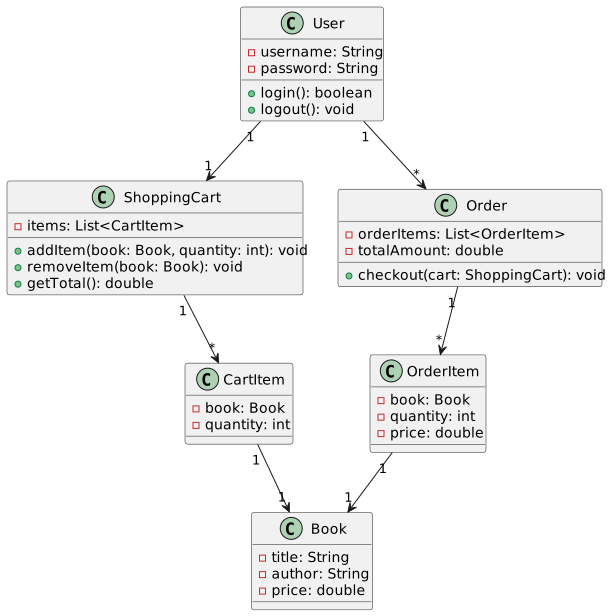
- Given an online bookstore system with functionalities for browsing books, adding books to a cart, and checking out, design a UML class diagram representing the key classes and their relationships.
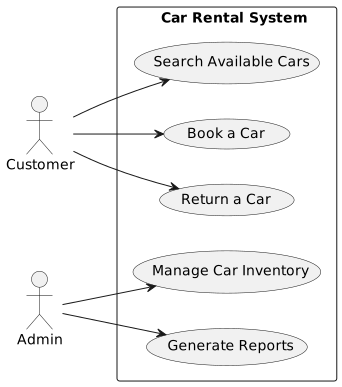
- Develop a UML use case diagram for a car rental system where users can search for available cars, book a car, and return a car. Include actors such as Customer and Admin.
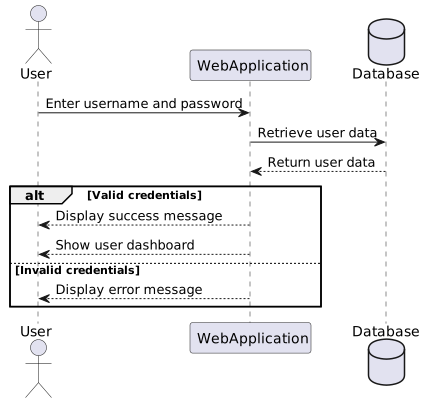
- Illustrate the sequence of interactions between a user, a web application, and a database when the user logs into the application.
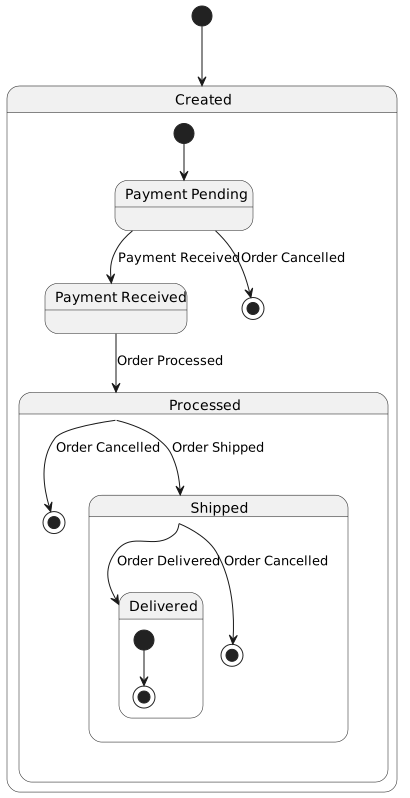
- Design a UML state diagram for an online order that transitions through states: Created, Processed, Shipped, and Delivered.
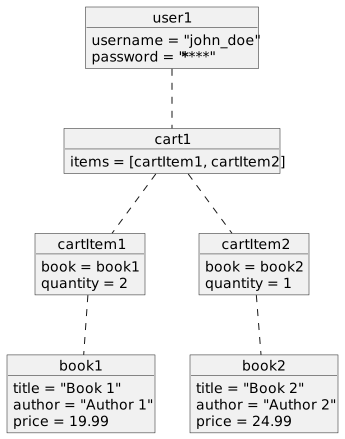
- Based on the class diagram you created for the online bookstore system (Question 1), draw a UML object diagram representing specific instances of books and a cart at a particular moment.
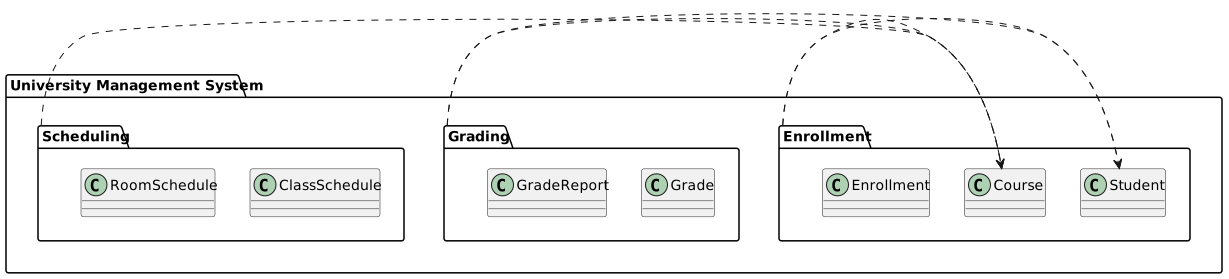
- Design a UML package diagram to organize the modules of a university management system into packages such as Enrollment, Grading, and Scheduling.
Design Pattern Questions
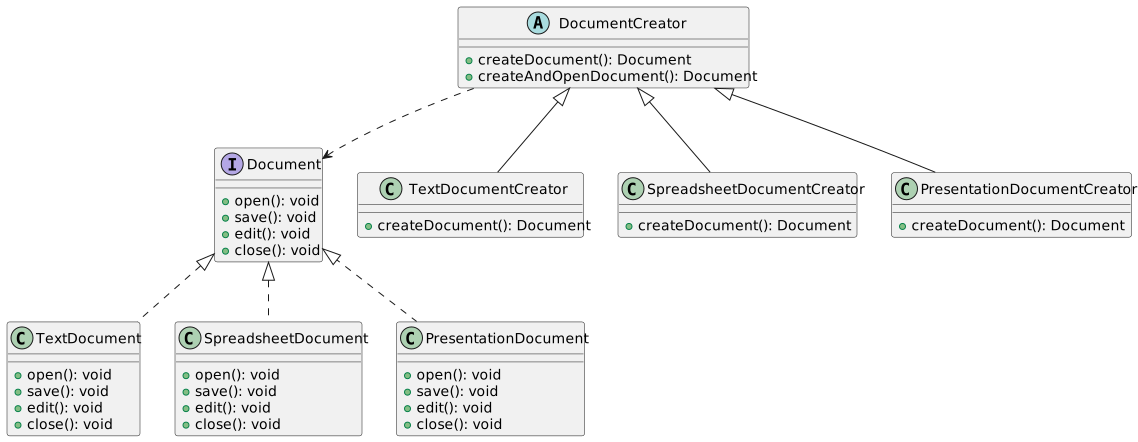
- Document Management System
// Product interface
interface Document {
    void open();
    void save();
    void edit();
    void close();
}

// Concrete products
class TextDocument implements Document {
    public void open() { /* ... */ }
    public void save() { /* ... */ }
    public void edit() { /* ... */ }
    public void close() { /* ... */ }
}

class SpreadsheetDocument implements Document {
    public void open() { /* ... */ }
    public void save() { /* ... */ }
    public void edit() { /* ... */ }
    public void close() { /* ... */ }
}

class PresentationDocument implements Document {
    public void open() { /* ... */ }
    public void save() { /* ... */ }
    public void edit() { /* ... */ }
    public void close() { /* ... */ }
}

// Abstract creator
abstract class DocumentCreator {
    public abstract Document createDocument();

    public Document createAndOpenDocument() {
        Document doc = createDocument();
        doc.open();
        return doc;
    }
}

// Concrete creators
class TextDocumentCreator extends DocumentCreator {
    public Document createDocument() {
        return new TextDocument();
    }
}

class SpreadsheetDocumentCreator extends DocumentCreator {
    public Document createDocument() {
        return new SpreadsheetDocument();
    }
}

class PresentationDocumentCreator extends DocumentCreator {
    public Document createDocument() {
        return new PresentationDocument();
    }
}
UML Diagram:
- Cross-Platform UI Widget Toolkit
// Abstract factory interface
interface UIFactory {
    Button createButton();
    TextField createTextField();
    CheckBox createCheckBox();
    // ...
}

// Concrete factories
class WindowsUIFactory implements UIFactory {
    public Button createButton() {
        return new WindowsButton();
    }

    public TextField createTextField() {
        return new WindowsTextField();
    }

    public CheckBox createCheckBox() {
        return new WindowsCheckBox();
    }
    // ...
}

class MacOSUIFactory implements UIFactory {
    public Button createButton() {
        return new MacOSButton();
    }

    public TextField createTextField() {
        return new MacOSTextField();
    }

    public CheckBox createCheckBox() {
        return new MacOSCheckBox();
    }
    // ...
}

// Abstract products
interface Button {
    void render();
    // ...
}

interface TextField {
    void render();
    // ...
}

interface CheckBox {
    void render();
    // ...
}

// Concrete products (Windows)
class WindowsButton implements Button {
    public void render() { /* ... */ }
}

class WindowsTextField implements TextField {
    public void render() { /* ... */ }
}

class WindowsCheckBox implements CheckBox {
    public void render() { /* ... */ }
}

// Concrete products (MacOS)
class MacOSButton implements Button {
    public void render() { /* ... */ }
}

class MacOSTextField implements TextField {
    public void render() { /* ... */ }
}

class MacOSCheckBox implements CheckBox {
    public void render() { /* ... */ }
}
UML Diagram: